SSRF Testing: Finding and Exploiting Server-Side Request Forgery
Overview
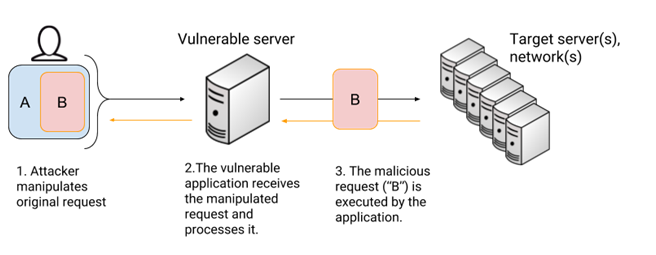
SSRF testing is the process of determining whether a web application can be manipulated into making server-side requests to locations chosen by an attacker. Server-Side Request Forgery (SSRF) becomes especially important when the application server can access resources that are unavailable to an external user, including localhost services, internal APIs, private network systems, cloud metadata services, or—in some vulnerable implementations—local files.
SSRF Testing frequently appears in features that legitimately need to retrieve external resources. Image importers, webhook testers, document processors, URL previews, PDF generators, API integrations, and remote file downloaders are all examples of functionality worth examining during an authorized security assessment.
A successful SSRF test does not necessarily mean the application is fully compromised. The important question is:
What can the server access that the attacker cannot?
Answering that question determines the real security impact of the vulnerability.
Authorization Notice: Only perform SSRF Testing against systems you own, intentionally vulnerable labs, CTF environments, or systems you have explicit permission to assess.
What Is SSRF?
Normally, when you enter a URL into a browser, your computer sends the request directly to the destination.
Your Computer
     |
     | HTTP Request
     v
External Server
With SSRF, the vulnerable application makes the request instead:
Your Computer
     |
     | Supplies URL
     v
Web Application
     |
     | Server-Side Request
     v
Destination
This difference is critical.
The application server may be located behind a firewall, have access to internal networks, trust localhost connections, or possess credentials unavailable to an external attacker.
SSRF effectively turns the vulnerable server into a request proxy.
Identifying Potential SSRF Parameters
SSRF Testing begins by finding functionality that accepts URLs or retrieves remote resources.
Parameters worth investigating may have names such as:
url=
uri=
path=
file=
image=
src=
source=
link=
redirect=
callback=
webhook=
feed=
download=
document=
cv=
The parameter name itself does not prove anything. Instead, determine what the application does with the supplied value.
For example:
https://example.test/file.php?cv=https://example.com/document.pdf
If the application retrieves the supplied document from example.com, the request is likely being performed server-side.
That functionality deserves further investigation.
Technique 1: Establish Normal Behavior
Before attempting unusual input, determine how the feature normally operates.
Suppose an application accepts:
https://example.com/image.jpg
Observe what happens when a valid resource is supplied.
Questions to answer include:
- Does the application display the resource?
- Does it download the resource?
- Does the response contain the retrieved content?
- Does the application report connection errors?
- Is there a noticeable delay?
- Does the server follow redirects?
- Are only certain protocols accepted?
Understanding normal behavior gives you a baseline for later tests.
Technique 2: Confirm Server-Side Retrieval
The next objective is determining whether the application server actually performs the request.
During an authorized lab assessment, use an HTTP endpoint you control or a purpose-built testing service and submit its URL to the application.
Conceptually:
https://TARGET/application?url=http://YOUR-CONTROLLED-SERVER/test
If your controlled server receives the request, you have strong evidence that the target application performed it.
This also allows you to examine information such as the source IP, HTTP method, request headers, and user agent generated by the application.
That information can help identify the backend library or service responsible for fetching resources.
[Screenshot – Controlled Server Receiving SSRF Request]
Technique 3: Test Localhost
Once server-side requests are confirmed, determine whether the application prevents access to its own loopback interface.
Common loopback addresses include:
http://127.0.0.1/
and:
http://localhost/
If the application retrieves these locations, the server may be capable of communicating with services bound only to localhost.
This is potentially significant because administrators sometimes configure internal services under the assumption that:
127.0.0.1
means they cannot be reached externally.
That assumption fails when another externally accessible application can be manipulated into making the request.
Why Localhost Matters
Consider a web application exposed publicly on port 80 while an administrative application listens only on:
127.0.0.1:8080
An external user cannot normally connect directly to that service.
An SSRF-vulnerable application, however, might be able to request:
http://127.0.0.1:8080/
The SSRF vulnerability therefore becomes a bridge between the external user and an otherwise inaccessible service.
Technique 4: Test Private Network Resources
Application servers often communicate with other systems on internal networks.
Private IPv4 address ranges include:
10.0.0.0/8
172.16.0.0/12
192.168.0.0/16
During an authorized assessment where internal-resource testing is within scope, SSRF may reveal whether the server can communicate with services in those networks.
For example:
http://192.168.1.10/
or:
http://10.0.0.5:8080/
The objective is not simply to send random requests throughout a network. Testing should remain within the authorized scope and be driven by information discovered during enumeration.
Different responses may reveal valuable information.
| Response | Possible Meaning |
|---|---|
| Immediate connection | Service may be accessible |
| Connection refused | Host may exist, but the port is closed |
| Timeout | Host may be unreachable or filtered |
| HTTP response | Web service is accessible |
| Different response size | Different backend behavior |
| Application error | Request may have reached the server-side fetcher |
SSRF can therefore sometimes provide limited information about network resources that cannot be contacted directly.
Technique 5: Test Alternate Ports
Do not assume an accessible host only exposes HTTP on port 80.
If enumeration or application information identifies another service, explicitly specifying its port can help determine whether the vulnerable server can access it.
Examples include:
http://127.0.0.1:8080/
http://127.0.0.1:3000/
http://10.0.0.10:8000/
The specific ports tested should be based on evidence from the assessment rather than arbitrary guessing whenever possible.
This is particularly useful when an application consists of several components, such as a public frontend communicating with a backend API on another port.
Technique 6: Test Supported URI Schemes
An application designed to retrieve HTTP resources should ideally restrict requests to required schemes such as:
http://
https://
Poorly configured applications or underlying libraries may support additional URI schemes.
One particularly important example is:
file://
In vulnerable environments, this may allow the server to retrieve files from its own filesystem.
A common harmless validation target on a Linux lab system is:
file:///etc/hostname
If successful, this indicates that what initially appeared to be an SSRF vulnerability can also provide local file read capabilities.
The security impact has now increased substantially.
Technique 7: Look for Application Configuration Files
Once local file access has been demonstrated in an authorized lab, configuration files become particularly important because web applications frequently store sensitive information in them.
Possible information includes:
- Database connection strings
- Database usernames and passwords
- API keys
- Application secrets
- Internal hostnames
- Authentication credentials
- Debugging configuration
- Filesystem paths
The exact location depends entirely on the application and server configuration.
Do not assume a configuration file exists at a particular location simply because another application used that path.
Enumeration should guide the investigation.
This was particularly important in the TryHackMe Recruit challenge, where information disclosure identified the location of a configuration file before SSRF was used to retrieve it.
Technique 8: Test Redirect Handling
URL validation can become more complicated when redirects are involved.
Consider an application that allows requests to:
https://allowed-example.com/
but blocks requests directly to:
http://127.0.0.1/
A security assessment should determine whether validation occurs only against the original URL or is repeated after redirects.
Conceptually:
Application
    |
    v
Allowed External URL
    |
    | HTTP Redirect
    v
Restricted Destination
Secure implementations should validate the final destination appropriately rather than trusting only the first URL supplied by the user.
Redirect handling is therefore an important part of SSRF testing.
Technique 9: Compare Responses Carefully
Not every SSRF vulnerability directly returns the requested resource.
Sometimes the application provides only indirect clues.
Compare:
- HTTP status codes
- Response lengths
- Error messages
- Connection errors
- Response times
- Application behavior
For example, requests to three destinations might produce:
Host A → Immediate error
Host B → 5-second timeout
Host C → HTTP response
Those differences can reveal information even when the underlying response is not directly displayed.
This becomes particularly important when investigating blind SSRF.
Blind SSRF
With traditional SSRF, the requested content may appear directly in the application’s response.
With blind SSRF, the application performs the request but does not return the destination’s response to the user.
For example:
Attacker
   |
   | supplies URL
   v
Application
   |
   | request occurs
   v
Controlled Server

Attacker never sees the response directly.
Testing blind SSRF therefore often requires observing the destination rather than the vulnerable application’s output.
If a request appears in logs on an HTTP server you control, it proves that the application initiated an outbound connection even if nothing useful appeared in the browser.
SSRF as a Pivot
One of the biggest mistakes when learning SSRF is treating successful URL retrieval as the end of the vulnerability.
It is usually the beginning of the investigation.
After confirming SSRF, ask:
- Can the server access localhost?
- Can it communicate with authorized internal systems?
- Are additional ports accessible?
- Which URI schemes are supported?
- Can local files be retrieved?
- Does the server follow redirects?
- Are internal APIs accessible?
- Does the response reveal sensitive information?
- Can information obtained through SSRF enable another vulnerability?
This is where vulnerability chaining becomes important.
An attack might progress like this:
SSRF
  ↓
Internal Resource
  ↓
Sensitive Information
  ↓
Credentials
  ↓
Authenticated Access
  ↓
Additional Vulnerability
  ↓
Privilege Escalation
SSRF does not necessarily provide direct system compromise. Instead, it may provide access to something that enables the next stage.
SSRF and Cloud Environments
SSRF deserves particular attention in cloud-hosted applications because servers may have access to infrastructure metadata or internal management services that are deliberately unavailable from the public Internet.
Modern cloud platforms provide protections intended to reduce these risks, but SSRF should still be considered during cloud application threat modeling.
Security teams should never assume that a service is safe simply because it is reachable only from an internal interface.
The application itself may become the path to that interface.
Common SSRF Testing Workflow
A structured approach helps prevent random testing:
1. Identify URL-handling functionality
        ↓
2. Establish normal application behavior
        ↓
3. Confirm server-side requests
        ↓
4. Test localhost access
        ↓
5. Test authorized internal resources
        ↓
6. Test relevant ports
        ↓
7. Determine supported URI schemes
        ↓
8. Investigate redirect handling
        ↓
9. Compare errors, timing, and responses
        ↓
10. Determine whether SSRF enables another attack
The goal is to progressively understand what the vulnerable server can access rather than immediately throwing large numbers of payloads at the application.
Defending Against SSRF
Preventing SSRF requires more than searching user input for strings such as localhost.
Use Destination Allowlisting
If an application only needs to communicate with specific services, explicitly define the destinations it is allowed to contact.
Allowlisting is generally stronger than attempting to maintain a list of every destination an attacker should not access.
Restrict URI Schemes
If the application only requires HTTP and HTTPS, unnecessary schemes should not be permitted.
For example, an application designed to retrieve web pages generally has no legitimate reason to accept:
file://
Validate Resolved Addresses
Applications should consider the address a hostname resolves to, not merely its textual hostname.
This helps prevent an apparently external hostname from resolving to a restricted internal or loopback address.
Revalidate Redirects
Destination validation should continue when redirects occur.
A safe initial destination should not automatically authorize whatever destination it redirects to.
Apply Network-Level Restrictions
Application servers should not automatically have unrestricted access to every internal network.
Firewalls, network segmentation, egress filtering, and service-level access controls can limit the damage caused by SSRF.
Protect Internal Services
Internal applications should still implement authentication and authorization.
Treating an internal network location as sufficient authentication can turn SSRF into an immediate security boundary bypass.
Common Mistakes During SSRF Testing
A frequent mistake is stopping after proving that the server can retrieve an external URL. Confirmation establishes that SSRF exists, but additional SSRF Testing determines its actual impact.
Another mistake is randomly scanning private networks through the vulnerable application. Testing should remain within scope and should be driven by evidence discovered during enumeration.
Finally, do not assume that SSRF automatically means local file inclusion, remote code execution, or full compromise. Those outcomes depend on the application’s implementation, supported protocols, reachable resources, and other vulnerabilities present in the environment.
Key Takeaways
Main lesson: SSRF testing is about determining what resources the application server can access on behalf of an attacker.
Important concepts of SSRF Testing :
http://127.0.0.1/
http://localhost/
file:///etc/hostname
These represent different questions during testing: can the server reach itself, and does the underlying fetch mechanism support local file access?
Skills practiced SSRF Testing :
- Identifying URL-handling functionality
- Confirming server-side requests
- Testing loopback access
- Investigating authorized internal resources
- Testing URI schemes
- Recognizing local file read opportunities
- Analyzing redirects
- Detecting blind SSRF
- Comparing response behavior
- Vulnerability chaining
Defensive considerations: Restrict destinations and protocols, validate resolved addresses, revalidate redirects, segment internal networks, limit application-server egress, protect internal services with authentication, and assume user-controlled URLs are untrusted input.
SSRF is especially dangerous because it changes the attacker’s position. Instead of asking “What can I reach?”, SSRF allows the attacker to ask “What can the server reach for me?”
That distinction is what makes Server-Side Request Forgery such an important web exploitation technique.
For a practical example of this attack chain, see my TryHackMe Recruit Walkthrough.