Management Wants a Word Walkthrough: 5 Windows Forensics Steps | TryHackMe
Overview
The Management Wants a Word walkthrough takes a different direction from many TryHackMe Hacker Holidays challenges. Instead of attacking a live web application or enumerating a remote host, this room provides a collection of Windows forensic artifacts that must be examined offline.
The investigation begins with a KAPE triage collection and develops into a chain involving Windows registry hives, NTLM credentials, Windows DPAPI, Chromium browser artifacts, and an encrypted VeraCrypt container.
What makes the room particularly interesting is how each recovered artifact becomes the key to the next stage of the investigation.
Spoiler Notice: This walkthrough explains the complete investigation methodology and commands used to solve the room. Passwords, hashes, cryptographic keys, and the final TryHackMe flag have been intentionally redacted.
Management Wants a Word Walkthrough: Investigation Path
The investigation followed five primary stages:
| Stage | Artifact | Purpose |
|---|---|---|
| 1 | KAPE collection | Identify useful Windows forensic evidence |
| 2 | SAM and SYSTEM | Recover the local account hash |
| 3 | DPAPI master key | Unlock Vera’s protected user data |
| 4 | Chrome artifacts | Recover a stored browser credential |
| 5 | VeraCrypt volume | Access the final evidence |
The important lesson is that none of these artifacts exists in isolation. Windows credential protection mechanisms often depend on other secrets associated with the same user account.
Step 1: Examining the KAPE Collection
The supplied evidence was structured like a Windows triage collection created with KAPE.
KAPE, or Kroll Artifact Parser and Extractor, is commonly used during incident response and digital forensic investigations to rapidly collect important artifacts from Windows systems.
Rather than immediately searching for the flag, I started by examining the directory structure.
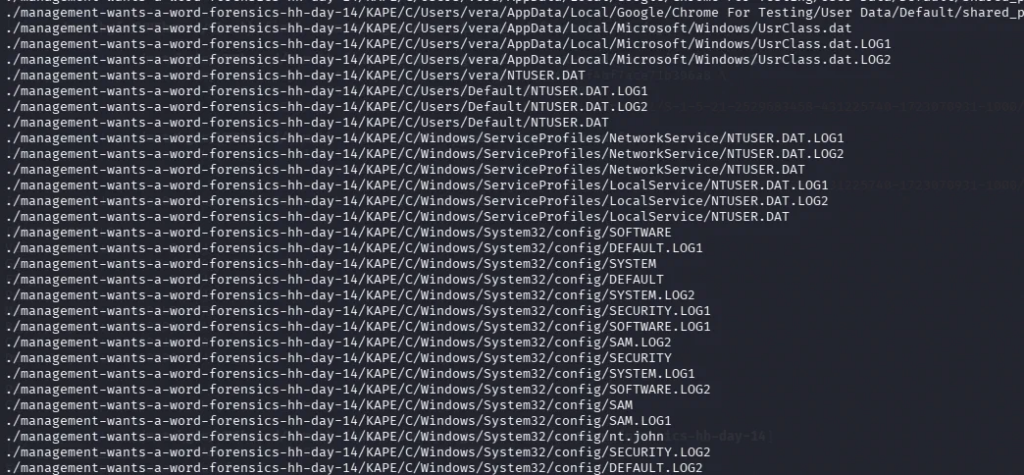
The collection contained recognizable Windows artifacts, including:
Users
Windows
SAM
SYSTEM
A user profile belonging to vera was also present.
These files immediately suggested several possible investigative paths. In particular, having both the SAM and SYSTEM registry hives meant that offline recovery of local Windows password hashes was possible.
Step 2: Recovering Vera’s Local Credential
Windows stores local account password information inside the Security Account Manager (SAM) database.
The SAM database cannot simply be opened and read as plaintext. Information from the SYSTEM registry hive is also required to decrypt the stored password hashes.
Because both artifacts were available in the forensic collection, I used Impacket’s secretsdump utility:
impacket-secretsdump -sam SAM -system SYSTEM LOCAL
What the command does
| Option | Purpose |
|---|---|
-sam SAM | Specifies the offline SAM registry hive |
-system SYSTEM | Supplies the SYSTEM hive required for decryption |
LOCAL | Tells secretsdump to process local hive files |
The output contained an NT hash associated with Vera’s Windows account.
I saved the recovered hash in a John the Ripper-compatible format and attempted a dictionary attack using the RockYou wordlist:
john --format=nt --wordlist=/usr/share/wordlists/rockyou.txt nt.john
John successfully recovered Vera’s Windows password.
Password: [REDACTED]
Recovering this password was significant because Windows uses a user’s credentials as part of its Data Protection API (DPAPI) protection process.
[Screenshot – John the Ripper Result]
Step 3: Decrypting the DPAPI Master Key
The next stage of the Management Wants a Word walkthrough involved Windows DPAPI.
DPAPI is a Windows mechanism applications can use to protect sensitive information without independently managing encryption keys. Browsers, credential managers, and other Windows applications frequently rely on it.
Inside Vera’s profile was a DPAPI master key stored beneath:
C:\Users\vera\AppData\Roaming\Microsoft\Protect\<SID>\
The relevant master key file could be processed using Impacket’s DPAPI utility.
The general command structure was:
impacket-dpapi masterkey \
  -file "<MASTERKEY_FILE>" \
  -sid "<USER_SID>" \
  -password "<RECOVERED_PASSWORD>"
Here:
-fileidentifies the DPAPI master key file.-sidsupplies Vera’s Windows Security Identifier.-passwordsupplies the previously recovered Windows password.
The command successfully decrypted Vera’s DPAPI master key.
DPAPI Master Key: [REDACTED]
This was the bridge between the Windows account and the browser artifacts.
[Screenshot – DPAPI Master Key Recovery]
Step 4: Investigating Chrome’s Local State and Login Data
The room’s clues suggested that the browser was remembering something important.
Chromium-based browsers store several useful forensic artifacts inside the user’s profile. Two files were particularly important:
Local State
Login Data
Local State
Chrome’s Local State file contains configuration information, including the encrypted key used to protect certain browser secrets.
On Windows, that key is protected using DPAPI.
Login Data
The Login Data file is a SQLite database containing information about credentials saved by the browser.
Relevant fields can include:
- Website origin
- Username
- Encrypted password data
The forensic chain therefore became:
Windows Password
      ↓
DPAPI Master Key
      ↓
Chrome Local State
      ↓
Chrome Encryption Key
      ↓
Login Data
      ↓
Saved Credential
Using the recovered DPAPI material, I extracted the browser encryption key from Local State and used it to decrypt the relevant entry from the Login Data database.
The result revealed a credential associated with the Byte Lotus environment:
URL:      http://bytelotus.thm:8080/
Username: [REDACTED]
Password: [REDACTED]
The recovered password wasn’t the final answer. Instead, it provided another clue about where Vera had been storing sensitive information.
[Screenshot – Chrome Credential Recovery]
Step 5: Opening the VeraCrypt Container
The browser credential led to an encrypted container located within Vera’s documents.
The container could be opened using cryptsetup, which supports TrueCrypt/VeraCrypt-compatible volumes.
I opened the volume using:
sudo cryptsetup open --type tcrypt --veracrypt \
  "C/Users/vera/Documents/backup" veracontainer
Command explanation
| Option | Purpose |
|---|---|
open | Opens an encrypted block device |
--type tcrypt | Uses TrueCrypt-compatible volume handling |
--veracrypt | Enables VeraCrypt compatibility |
veracontainer | Creates the mapped device name |
After supplying the recovered password, the encrypted volume became available through the Linux device mapper.
I then created a mount point and mounted the volume for examination:
sudo mkdir -p /mnt/veradata
sudo mount -o ro /dev/mapper/veracontainer /mnt/veradata
Using -o ro mounts the filesystem read-only, which is preferable during forensic analysis because it reduces the possibility of modifying the evidence.
[Screenshot – Mounted VeraCrypt Container]
Locating the Final Evidence
With the VeraCrypt container mounted, I examined its contents.
Several files were present, including financial-looking records and an invoice PDF. One document stood out:
important_invoice_byte_lotus.pdf
Opening the invoice revealed the flag required to complete the room.
THM{[REDACTED]}
The important part wasn’t simply finding the PDF. It was understanding the sequence of artifacts required to reach it.
How the Entire Forensic Chain Worked
The complete investigation can be summarized as:
KAPE Collection
      │
      ▼
SAM + SYSTEM
      │
      ▼
Vera's NT Hash
      │
      ▼
Recovered Windows Password
      │
      ▼
DPAPI Master Key
      │
      ▼
Chrome Local State
      │
      ▼
Chrome Encryption Key
      │
      ▼
Chrome Login Data
      │
      ▼
Saved Browser Credential
      │
      ▼
VeraCrypt Container
      │
      ▼
Invoice PDF
      │
      ▼
Final Evidence
That chain is what made Management Wants a Word an enjoyable Windows forensics challenge. There wasn’t one magic command that solved the room. Each piece of evidence provided enough information to unlock the next layer.
Security Lessons
From a defensive perspective, this challenge demonstrates why access to a Windows user’s profile can expose significantly more information than individual files.
An attacker or forensic investigator who obtains the right combination of registry hives and user artifacts may potentially reconstruct access to secrets protected elsewhere on the system.
The room highlights several important areas defenders should consider:
- Protect forensic and system backups as carefully as live systems.
- Avoid storing unnecessary passwords in browsers.
- Use strong, unique Windows account passwords.
- Encrypt sensitive archives with credentials that are not reused elsewhere.
- Restrict access to Windows user profiles and registry hive backups.
- Treat browser profiles as sensitive credential stores.
DPAPI provides meaningful protection, but that protection is part of a larger security model. Once enough pieces of that model become available to an investigator, protected application data may become recoverable.
Tools Used
| Tool | Purpose |
|---|---|
| KAPE | Windows forensic artifact collection |
Impacket secretsdump | Extract local Windows password hashes |
| John the Ripper | Perform offline password recovery |
Impacket dpapi | Decrypt Windows DPAPI material |
| Python | Process Chrome browser artifacts |
| SQLite | Examine Chrome’s Login Data database |
| cryptsetup | Open the VeraCrypt-compatible container |
Lessons Learned
The biggest takeaway from this room was how closely connected Windows forensic artifacts can be.
The SAM and SYSTEM hives exposed information about the local account. The recovered account credential enabled DPAPI decryption. DPAPI then provided access to Chrome’s protected encryption material. The browser artifacts revealed another credential, which ultimately unlocked the VeraCrypt container containing the final evidence.
For anyone learning Windows forensics, this is a useful example of why investigators should think in terms of artifact relationships rather than examining individual files independently.
Key Takeaways
Main lesson: Windows forensic investigations frequently involve following credentials and cryptographic dependencies across multiple artifacts.
Important commands:
impacket-secretsdump -sam SAM -system SYSTEM LOCAL
john --format=nt --wordlist=/usr/share/wordlists/rockyou.txt nt.john
impacket-dpapi masterkey -file "<MASTERKEY_FILE>" \
  -sid "<USER_SID>" \
  -password "<RECOVERED_PASSWORD>"
sudo cryptsetup open --type tcrypt --veracrypt \
  "C/Users/vera/Documents/backup" veracontainer
Skills practiced:
- Windows forensic triage
- Registry hive analysis
- Offline NTLM password recovery
- Windows DPAPI analysis
- Chromium credential forensics
- SQLite artifact analysis
- VeraCrypt volume examination
Defensive consideration: Protecting a password alone is not enough. Registry hives, browser profiles, DPAPI material, backups, and encrypted containers can collectively expose sensitive information when an investigator gains access to the complete forensic chain.