TryHackMe Brr Walkthrough: ScadaBR, Modbus TCP, and PLC Security
Overview
TryHackMe Brr Walkthrough explores an interesting side of cybersecurity that does not always receive as much attention as traditional web exploitation: Operational Technology (OT) and Industrial Control Systems (ICS). The Brr room introduces ScadaBR, a SCADA management platform, and a simulated Programmable Logic Controller (PLC) communicating over Modbus TCP.
What makes this room especially useful from an educational perspective is that the web application is only the beginning. ScadaBR provides information about the industrial environment, but the important process data resides within the PLC. After identifying the PLC and its Modbus service, the challenge becomes understanding how Modbus works, how holding registers can be queried, and why improperly protected industrial protocols can expose sensitive process information.
This TryHackMe Brr Walkthrough focuses not only on completing the room, but also on understanding the underlying security problem. Reading a Modbus holding register is a legitimate protocol operation. The vulnerability exists because an unauthorized system can reach the PLC, communicate with it, and retrieve data without sufficient authentication or network restrictions.
Note: This walkthrough focuses on the methodology and the vulnerability rather than publishing the room’s final flag.
Initial Enumeration
The target machine for this lab was:
10.64.143.118
As always, the first step was identifying the services exposed by the target.
nmap -sC -sV 10.64.143.118
Command Explanation
| Option | Purpose |
|---|---|
-sC | Runs Nmap’s default NSE scripts against discovered services |
-sV | Attempts to identify service versions |
10.64.143.118 | Target IP address |
The scan identified several interesting services.
| Port | Service | Description |
|---|---|---|
| 22/tcp | SSH | Secure remote administration |
| 80/tcp | tcpwrapped | Service protected or obscured through TCP wrappers/connection handling |
| 5020/tcp | Unknown/Modbus | Later identified as the PLC’s Modbus TCP service |
| 5901/tcp | VNC | Remote graphical desktop access |
| 8080/tcp | HTTP | Apache Tomcat/Coyote hosting ScadaBR |
Port 8080 immediately stood out because it exposed an HTTP service running through Apache Tomcat. Opening the service revealed the ScadaBR login interface:
http://10.64.143.118:8080/ScadaBR/login.htm
Discovering ScadaBR
ScadaBR is a Supervisory Control and Data Acquisition platform. SCADA systems are commonly used to monitor industrial environments such as manufacturing equipment, pumps, utilities, environmental controls, and other physical processes.
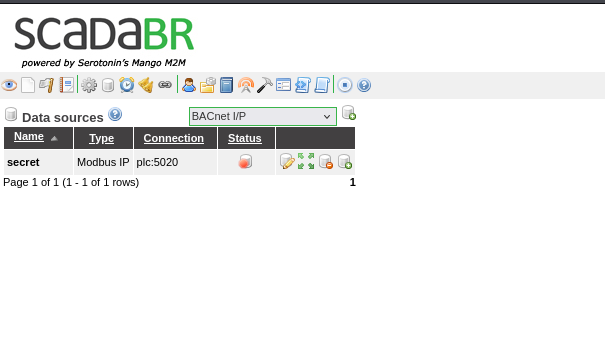
After identifying the application, researching its default credentials provided access to the administrative interface. From there, the Data Sources section revealed an important piece of information: a Modbus IP data source pointing toward:
plc:5020
That changed the direction of the investigation.
ScadaBR wasn’t necessarily where the interesting process data lived. It was acting as the interface used to communicate with another system: the PLC.
What Is a PLC?
A Programmable Logic Controller is a specialized computer designed to control physical processes. PLCs can read sensors, operate motors, open valves, control pumps, manage production equipment, and perform countless other industrial functions.
Unlike a normal workstation, a PLC typically interacts directly with physical equipment.
For example:
Temperature Sensor
       |
       v
      PLC
       |
       v
 Cooling System
The PLC might continuously read a temperature value and activate cooling equipment when that value exceeds a configured threshold.
This is one reason OT security is so important. Compromising an ordinary workstation may expose information. Compromising industrial control equipment can potentially affect physical processes.
Understanding Modbus TCP
The PLC identified in Brr communicates using Modbus TCP.
Modbus is an industrial communication protocol originally developed for communication with PLCs. It is intentionally simple, which contributed to its widespread adoption.
Modbus devices expose several types of data, including:
| Data Type | Typical Purpose |
|---|---|
| Coils | Single-bit read/write values |
| Discrete Inputs | Single-bit read-only values |
| Input Registers | 16-bit read-only values |
| Holding Registers | 16-bit read/write values |
The important part of this room is the holding registers.
Think of registers as numbered storage locations inside the PLC.
Register 0  -> 0x0054
Register 1  -> 0x0048
Register 2  -> 0x004d
Register 3  -> 0x007b
When those hexadecimal values are interpreted as ASCII characters, they begin forming readable text.
That is where the room’s flag was stored.
Reading the PLC Registers
Normally, a Python Modbus library such as pymodbus could simplify communication with the PLC. In this environment, however, the protocol was constructed directly using Python’s socket and struct modules.
The script used during the room was:
import socket, struct

# PDU: function code 0x03 (read holding registers), start=0, count=60
pdu = struct.pack(">BHH", 0x03, 0, 60)

# MBAP header: transaction id, protocol id, length, unit id
mbap = struct.pack(">HHHB", 1, 0, len(pdu) + 1, 1)

s = socket.socket()
s.connect(("10.64.143.118", 5020))
s.sendall(mbap + pdu)
resp = s.recv(4096)

# skip MBAP header (7 bytes) + function code (1 byte) + byte-count (1 byte)
byte_count = resp[8]
regs = struct.unpack(">" + "H" * (byte_count // 2), resp[9:9 + byte_count])

# each register stores one ASCII character
print("".join(chr(r) for r in regs if 32 <= r < 127))
This script manually creates a valid Modbus TCP request and asks the PLC to return its holding registers.
Function Code 0x03
This line is particularly important:
pdu = struct.pack(">BHH", 0x03, 0, 60)
Modbus function code:
0x03
means:
Read Holding Registers
The request starts at register 0 and requests 60 registers.
The script then establishes a TCP connection:
s.connect(("10.64.143.118", 5020))
and sends the Modbus request:
s.sendall(mbap + pdu)
After receiving the response, the returned 16-bit register values are unpacked and printable values are converted into ASCII characters.
Conceptually, the process looks like this:
Attacker
   |
   | Modbus Function 0x03
   | Read Holding Registers
   v
PLC :5020
   |
   | Register Values
   v
0x0054 0x0048 0x004d 0x007b ...
   |
   v
ASCII Decoding
   |
   v
THM{...}
The final flag is intentionally omitted here.
So What Is the Actual Vulnerability?
This is the most important lesson from Brr.
Reading a Modbus register is not itself an exploit. Function 0x03 is a legitimate part of the Modbus protocol. The security problem is that an unauthorized system can reach the PLC and issue that legitimate request.
Classic Modbus was designed for trusted industrial networks. Strong authentication, authorization, encryption, and confidentiality were not fundamental parts of the original protocol design.
In a poorly segmented environment, an attacker who gains network access may therefore be able to communicate directly with industrial equipment.
In Brr, the impact is simply retrieving a flag.
In a real environment, holding registers could represent operational information such as:
Temperature
Pressure
Motor state
Pump status
Valve position
Production counters
Alarm thresholds
Configuration values
Depending on the device and configuration, writable registers or coils can present an even greater risk because unauthorized commands could potentially modify the industrial process.
Why SCADA Default Credentials Matter
Another important weakness demonstrated by this room is the use of default administrative credentials.
Default credentials are dangerous because they are often publicly documented. An attacker does not necessarily need to crack a password if the administrator never changed the credentials supplied with the product.
Access to the SCADA interface can also reveal information that helps map the OT environment, including device names, data sources, protocols, and network locations.
The compromise path demonstrated by the room can therefore be summarized as:
Network Enumeration
        |
        v
ScadaBR Discovered
        |
        v
Default Credentials
        |
        v
Data Sources Examined
        |
        v
PLC Identified
        |
        v
Modbus TCP Discovered
        |
        v
Holding Registers Read
        |
        v
Sensitive Data Recovered
Defending Against This Type of Attack
The most important defense is network segmentation. PLCs and other industrial equipment should not be directly reachable from ordinary user networks or untrusted systems.
A simplified architecture might look like:
Internet
   |
Firewall
   |
Corporate Network
   |
OT Firewall
   |
SCADA / Engineering Network
   |
PLC Network
Firewall rules should explicitly control which systems are permitted to communicate with PLCs. If only a SCADA server needs to communicate with a particular PLC, there is little reason for every workstation on the network to have that same access.
Change Default Credentials
Default passwords on SCADA applications, HMIs, engineering workstations, gateways, and other management interfaces should be changed before deployment.
Passwords should also be:
- Unique to the device or application.
- Stored securely.
- Restricted to authorized personnel.
- Rotated when appropriate.
- Protected with MFA where the platform supports it.
Restrict Modbus Communication
Access-control rules should restrict Modbus traffic to known systems that actually require it.
Conceptually:
SCADA Server -> PLC:5020   ALLOW
Engineering Workstation -> PLC:5020   ALLOW when required
Corporate Workstations -> PLC:5020   DENY
Guest Network -> PLC:5020   DENY
Internet -> PLC:5020   DENY
This dramatically reduces the number of systems capable of sending Modbus commands.
Monitor Industrial Protocols
Organizations should also monitor traffic crossing OT network boundaries.
Unexpected requests to read large ranges of registers can be worth investigating, while unexpected write operations deserve particular attention because they may indicate an attempt to alter a physical process.
Industrial IDS/IPS platforms, firewall logging, network monitoring, and SIEM correlation can help detect abnormal activity.
Minimize Exposure of Management Interfaces
SCADA administration interfaces should not be unnecessarily exposed to large network segments.
Administrative access can instead be limited through controls such as:
- Dedicated management networks.
- Jump hosts.
- VPN access.
- Firewall allowlists.
- Role-based access control.
- MFA where supported.
- Centralized logging and monitoring.
Security Lessons from Brr
The TryHackMe Brr room demonstrates something much bigger than simply extracting a CTF flag.
The attacker did not need a complicated memory corruption exploit to retrieve the information. The weakness came from trust: default credentials exposed the industrial configuration, the PLC was reachable over the network, and Modbus accepted a legitimate register-read request.
That distinction is important when learning OT security.
A protocol can be functioning exactly as designed and still create a serious security problem when deployed without appropriate compensating controls.
Tools and Techniques Used
| Tool/Technique | Purpose |
|---|---|
| Nmap | Discover exposed network services |
| Web browser | Access the ScadaBR interface |
| ScadaBR | Identify the configured industrial data source |
| Python | Construct the Modbus TCP request |
socket | Establish the raw TCP connection |
struct | Construct and decode binary protocol structures |
Modbus 0x03 | Read PLC holding registers |
| ASCII decoding | Convert register values into readable text |
Defensive Considerations
From a blue-team perspective, this room reinforces the importance of treating OT networks differently from ordinary enterprise networks. Industrial protocols may lack security features that administrators take for granted in modern IT environments.
The solution is therefore not simply “patch Modbus.” Organizations need layered defenses around legacy and industrial protocols: segmentation, restrictive firewall policies, secure remote administration, credential management, asset inventories, monitoring, and strict control over which systems are allowed to communicate with industrial equipment.
Key Takeaways
The main lesson from TryHackMe Brr is that OT security often depends heavily on the architecture surrounding industrial devices. ScadaBR exposed information about the underlying PLC, and the reachable Modbus TCP service allowed its holding registers to be queried.
The most important command from the enumeration phase was:
nmap -sC -sV 10.64.143.118
The most important protocol concept was:
Modbus Function Code 0x03 = Read Holding Registers
Skills practiced in this room included network enumeration, SCADA reconnaissance, PLC identification, Modbus TCP communication, Python socket programming, binary protocol parsing, register decoding, and OT/ICS security analysis.
From the defensive side, the biggest takeaway is simple: do not rely on an industrial protocol itself to provide the security boundary. Restrict who can reach the device in the first place.