Online Privacy Guide: Tor, VPNs, Encrypted DNS, and Staying Anonymous
An Online Privacy Guide should start with an uncomfortable fact: there is no switch, browser, VPN, or piece of software that makes you completely private online.
You can reduce tracking. You can make surveillance more difficult. You can prevent your internet provider from seeing certain information. You can separate parts of your online identity. You can even use networks such as Tor to make identifying where a connection originated considerably more difficult.
But none of those things creates a magic cloak around your computer.
The most important privacy tool is still how you behave online.
Privacy tools cannot compensate for privacy habits.
You could run Tor through a VPN, use encrypted DNS, disable every unnecessary Windows telemetry setting, and browse from a privacy-focused operating system. If you then sign into the same Google account you have used for fifteen years, reuse your normal username, upload a photograph containing location data, and give a website your real name and phone number, you have created multiple ways to reconnect that activity to you.
That distinction is what this guide is really about.
There Is No Such Thing as Total Online Privacy
Before choosing privacy tools, it helps to ask a much simpler question:
Who are you trying to keep information from?
That is essentially the idea behind a threat model.
Maybe you simply don’t want advertising companies following you across hundreds of websites. Perhaps you don’t want every application on your phone collecting location information. Maybe you frequently use hotel and airport Wi-Fi and want additional protection for your network traffic.
Those are very different problems from trying to browse anonymously.
Privacy and anonymity aren’t interchangeable.
Privacy is largely about controlling what information is collected, exposed, and associated with you. Anonymity is about preventing an activity from being connected to your identity in the first place.
The tools overlap, but the goals are different.
Tor Browser: Going Beyond Private Browsing
A browser’s normal private or incognito mode is frequently misunderstood.
It mainly prevents the browser from keeping certain local information after the session ends. It doesn’t magically hide your connection from your ISP, make you anonymous to websites, or prevent a service from knowing who you are after you log into an account.
Tor Browser takes a fundamentally different approach.
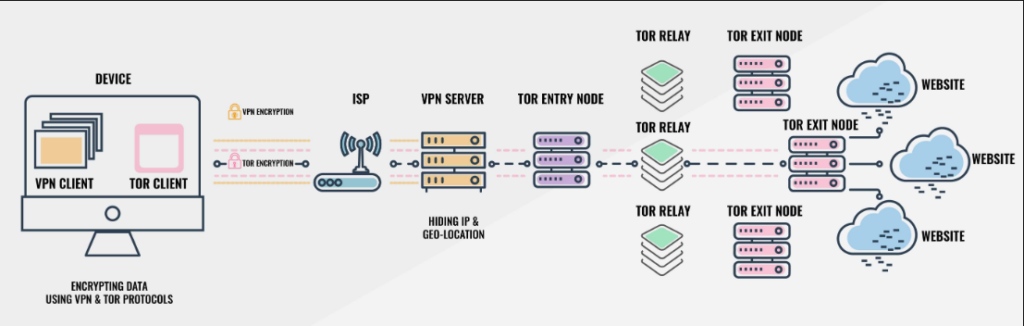
Tor routes your connection through multiple relays before it reaches its destination. In a typical Tor circuit, traffic passes through an entry or guard relay, a middle relay, and an exit relay.
Each part of that path has only part of the picture.
That makes determining both where the traffic originated and where it ultimately went considerably more difficult than with a normal direct internet connection.
There is another important part of Tor Browser that is easy to overlook: users are intentionally made to look more alike.
That is one reason casually customizing Tor Browser isn’t necessarily a good idea. Installing unusual extensions, modifying certain browser characteristics, or otherwise creating a unique configuration can potentially make your browser more distinctive.
Sometimes privacy comes from blending into the crowd.
There is also little point in carefully establishing an anonymous Tor session and immediately logging into an account containing your real identity.
Google doesn’t need to determine your home IP address if you just told Google who you are by logging into your account.
Tor can protect the route your connection takes. It can’t prevent you from identifying yourself.
VPNs: Useful, but You’re Moving Trust
VPN advertising has created an enormous amount of confusion about online privacy.
A VPN establishes an encrypted connection between your device and the VPN provider. Among other benefits, this can prevent your local ISP or someone observing the local network from easily seeing the destinations of your direct connections in the same way they otherwise might.
Websites also generally see the VPN server’s public IP address rather than your normal public IP address.
Those are useful capabilities.
But you’ve also changed who occupies an important position of trust.
Without the VPN, your ISP handles your internet connection. With the VPN, the VPN provider can potentially occupy a privileged position over a significant amount of your traffic.
That makes the provider’s technical design, jurisdiction, security history, and logging practices important.
A statement such as “military-grade encryption” doesn’t mean you’re anonymous.
Modern encryption is expected. The harder question is what information the company can collect, what it actually logs, how its systems are designed, and whether its privacy claims can be independently supported.
A VPN can be an excellent privacy and security tool.
It is not an anonymity button.
Tor vs. VPN
People often ask whether Tor or a VPN is better.
The better question is: better for what?
A VPN is convenient for everyday use. It can protect traffic on untrusted networks, hide your normal public IP address from destination websites, and reduce what your ISP can directly observe about the destinations you access.
Tor is designed around a different problem. Its distributed relay system makes it much more difficult for one participant in the connection to know both who you are and where you’re going.
The tradeoff is usability.
Tor connections can be slower. Some websites block Tor exit nodes. CAPTCHAs are common. Streaming and other bandwidth-heavy activities aren’t what the network was designed for.
For ordinary everyday privacy, a reputable VPN may be useful.
For situations where separating network activity from your identity is the actual objective, Tor makes much more sense.
Neither eliminates the need for good habits.
Encrypted DNS: Protecting Another Piece of the Connection
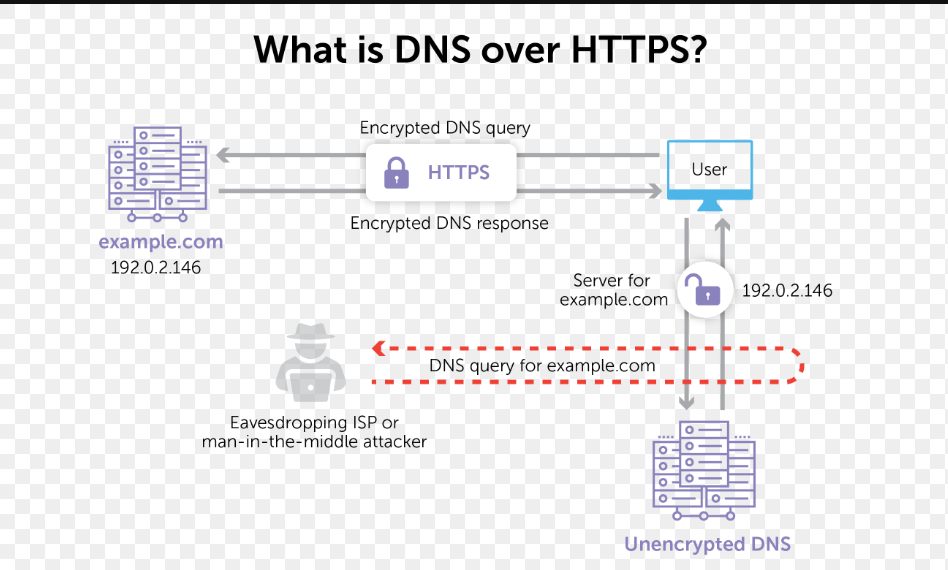
DNS is essentially part of the internet’s directory system. When you type in google.com, DNS take that name we know, and tranlates it into a Number. When the internet was invented, they realized people remember names, better than numbers. Its known as “resloving a host name.”
Traditional DNS queries can expose information about the domains you’re requesting.
Technologies such as DNS over HTTPS (DoH) and DNS over TLS (DoT) encrypt those DNS requests between your device and the DNS resolver.
Public resolvers such as Cloudflare and Quad9 support encrypted DNS options, and modern browsers and operating systems increasingly support them directly.
This is worthwhile, but encrypted DNS has limits.
It protects DNS queries from certain forms of observation and manipulation. It doesn’t make the rest of your connection anonymous, and you’re still choosing a DNS resolver that handles those requests.
Once again, privacy often involves deciding who you trust with what information.
Privacy-Focused Browsers

Your browser is one of the largest privacy surfaces on your computer.
Firefox provides extensive privacy controls and tracking protections. Brave includes aggressive tracker and advertising protections by default. Tor Browser goes substantially further when anonymity and resistance to tracking are priorities.
But there is a trap here too.
It is tempting to install every privacy extension you can find.
Ten extensions aren’t necessarily ten times more private.
Browser fingerprinting can use characteristics of your browser and device to distinguish you from other users. An unusual collection of extensions, fonts, display properties, browser settings, and other characteristics can contribute to making your configuration more recognizable.
The objective shouldn’t be to install everything labeled “privacy.”
It should be to expose less information without unnecessarily making yourself unique.
Search Engines and Your Search History
Search queries can reveal an extraordinary amount about someone.
People search for medical questions, financial problems, relationships, employers, products, political subjects, travel destinations, addresses, hobbies, and things they would probably never voluntarily put into a public profile.
When those searches occur while you’re signed into a large advertising ecosystem, they can become another source of information associated with your account or browser activity.
Privacy-oriented search engines provide alternatives for people who don’t want every search tied as closely to a long-term advertising profile.
Changing your search engine isn’t the same as becoming anonymous.
It simply removes or reduces one source of routine data collection.
That is a recurring theme throughout this guide: privacy usually improves through layers rather than one dramatic change.
Email Aliases
Your email address is another surprisingly useful identifier.
If you use the same permanent email address for shopping, newsletters, forums, software registrations, contests, travel sites, and dozens of other services, that address becomes an easy common identifier.
Email aliases provide another option.
Instead of giving every company the same address, you can create unique addresses that forward to your actual mailbox.
Besides reducing correlation between accounts, aliases make it easier to determine where spam originated. If an address created specifically for one company suddenly starts receiving unrelated mail, you have a pretty good clue about where it came from.
Aliases can also be disabled without abandoning your primary email account.
Tracker and Ad Blocking
Modern websites can contain scripts and resources from numerous third parties.
Some provide legitimate functionality. Others support analytics, advertising, fingerprinting, or cross-site tracking.
Browser-native tracking protection can eliminate a significant amount of this activity without requiring much configuration.
Content blockers such as uBlock Origin can provide additional control where they are supported.
The goal isn’t simply making advertisements disappear.
Reducing unnecessary third-party connections means fewer outside systems receive information about your browsing activity in the first place.
Separate Identities
This may be the most important section of this entire Online Privacy Guide.
Technology can’t separate identities that you continually reconnect yourself.
Suppose you create a privacy-focused browser profile, route it through Tor, and use it for activity you don’t want connected with your everyday identity.
Then you log into your normal Facebook account.
You just connected those worlds yourself.
The same problem occurs when people reuse usernames, email addresses, profile pictures, phone numbers, recovery addresses, or other recognizable information.
If separation actually matters, identities need to remain separated.
That can mean separate browser profiles, separate email aliases, different usernames, and being deliberate about which accounts are accessed from which environment.
This isn’t necessary for everybody.
But it demonstrates why privacy is as much an operational practice as a technical one.
Metadata Matters
Sometimes the information you didn’t intend to publish reveals more than the information you did.
Digital photographs can contain EXIF metadata including camera information, timestamps, and potentially GPS coordinates. Documents can contain author names, organization information, revision history, usernames, or software details.
Even filenames can reveal information.
A carefully anonymous account uploading a file named something like Brody-Wright-Home-Office.jpg has a fairly obvious problem.
Before publishing files anonymously or semi-anonymously, consider what information exists inside the file as well as what appears on the screen.
Metadata is easy to forget because you usually don’t see it.
That doesn’t mean it isn’t there.
Your Phone Is a Tracking Device Too
Improving privacy on your desktop while ignoring your phone only addresses part of the problem.
Phones routinely interact with location services, Wi-Fi networks, Bluetooth devices, advertising systems, application permissions, cloud accounts, browsers, cellular networks, and dozens of installed applications.
That doesn’t mean you need to throw your smartphone into the ocean.
It means privacy settings should extend across your devices.
I’ve covered those controls separately in my Android and iPhone Privacy Guide, including location permissions, advertising controls, application permissions, browser settings, and other practical changes.
The same principle applies to Windows 11, which is why I also maintain a separate guide for reducing unnecessary tracking and cleaning up privacy-related settings there.
Those device-specific guides handle the switches.
This article is about understanding what those switches can—and can’t—accomplish.
Privacy Comes With a Cost
There is a reason most people don’t operate at maximum privacy all the time.
Privacy protections frequently reduce convenience.
Tor can be slower. VPN addresses may trigger additional security checks. Tracker blocking can break websites. Rejecting cookies means preferences aren’t remembered. Separating identities means managing additional accounts. Disabling location access can make certain applications less useful.
You may encounter more CAPTCHAs.
You may have to authenticate more frequently.
Websites may occasionally refuse to work until you loosen a setting.
That’s the tradeoff.
The objective isn’t necessarily maximum privacy.
It’s deciding how much privacy makes sense for what you’re doing.
Three Practical Levels of Online Privacy
Instead of telling everyone to install Tor and disappear from the internet, I think it makes more sense to think about privacy in three levels.
Normal Privacy
This is where most people should probably begin.
Harden Windows, Android, and iPhone privacy settings. Review application permissions. Restrict unnecessary location access. Enable browser tracking protection. Consider encrypted DNS. Remove software and browser extensions you don’t need.
You’re still using the normal internet and your normal accounts.
You’re simply reducing unnecessary collection.
Enhanced Privacy
The next level requires changing some habits in addition to changing settings.
Use privacy-focused browsers and search engines where appropriate. Block unnecessary trackers. Use a VPN when it serves an actual purpose. Create email aliases instead of giving every website the same address. Separate certain browser profiles and accounts.
Most importantly, start thinking about how information from different services can be correlated.
The objective is no longer simply blocking trackers.
You’re reducing how easily your activity can be assembled into one profile.
Anonymity-Focused
This is a fundamentally different objective.
Use Tor Browser when anonymity is actually required. Avoid unnecessary account logins. Keep identities compartmentalized. Don’t reuse identifying usernames or email addresses. Understand metadata before uploading files.
And determine your threat model before doing any of it.
Anonymity requires discipline precisely because a single technical tool can’t provide it by itself.
The Most Important Privacy Tool Isn’t Software
There are plenty of worthwhile privacy technologies.
Tor is remarkable technology. VPNs solve legitimate problems. Encrypted DNS protects an otherwise exposed part of internet communication. Browser protections can stop enormous amounts of routine tracking. Aliases can prevent your permanent email address from becoming a universal identifier.
But none of them can stop you from voluntarily identifying yourself.
That’s why the most important principle in this entire guide is worth repeating:
Privacy tools cannot compensate for privacy habits.
You don’t need to disappear from the internet to improve your privacy.
You just need to understand what information you’re giving away, who receives it, how different pieces can be connected, and which tools actually address the problem you’re trying to solve.
That’s a much better starting point than installing ten privacy applications and assuming nobody can see you.