Ports, Services, and the TCP Three-Way Handshake
Before using tools such as Nmap, it helps to understand what the tool is actually testing. Network services listen on numbered ports, and TCP uses a three-step process to establish a reliable connection between two systems. Understanding these concepts makes Nmap results easier to interpret and helps explain why ports appear as open, closed, or filtered.
What Is a Port?
A port is a logical communication endpoint identified by a number from 0 through 65,535. The IP address identifies the destination system, while the port number identifies the application or service that should receive the traffic
- Ports 0–1023: Well-known ports commonly assigned to standard services
- Ports 1024–49151: Registered ports used by applications and vendors
- Ports 49152–65535: Dynamic or ephemeral ports commonly used for temporary client connections
| 21 | TCP | FTP |
| 22 | TCP | SSH |
| 25 | TCP | SMTP |
| 53 | TCP/UDP | DNS |
| 80 | TCP | HTTP |
| 443 | TCP | HTTPS |
| 3389 | TCP/UDP | Remote Desktop |
The TCP Three-Way Handshake
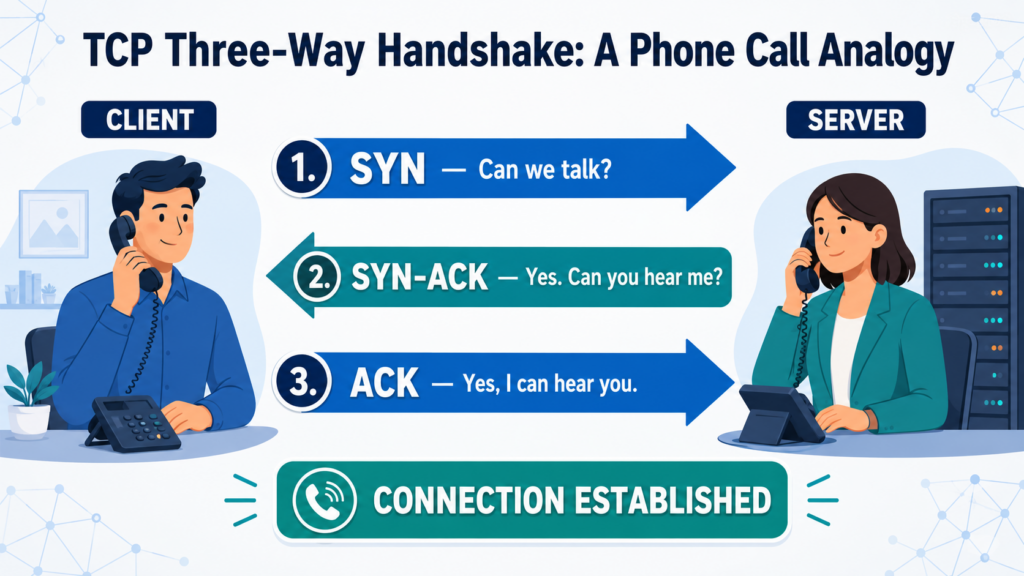
Before two systems exchange application data over TCP, they establish a connection using the three-way handshake. TCP flags in the packet headers coordinate this process
- SYN: The client sends a synchronization packet to request a connection.
- SYN-ACK: The server acknowledges the request and sends its own synchronization packet.
- ACK: The client acknowledges the server’s response, completing the connection.
Think of the 3-Way handshake as a phone call.
How Nmap Uses the Handshake
Nmap uses TCP responses to determine whether a port is open, closed, or filtered. Its default SYN scan sends the first SYN packet but does not complete the full handshake.
sudo nmap -sS -p80 <TARGET_IP>- SYN-ACK received: The port is open.
- RST received: The port is closed.
- No response or an ICMP error: The port may be filtered.
- Nmap sends RST: Nmap ends the connection without completing the handshake.
SYN Scan vs. TCP Connect Scan
A SYN scan stops before completing the TCP handshake, while a TCP connect scan establishes a complete connection using the operating system’s networking functions.
| Scan | Command | Behavior |
| SYN scan | sudo nmap -sS <Target_IP> | Sends SYN, evaluates the response, and resets an open connection |
| TCP connect scan | nmap -sT <Target_IP> | Completes the full TCP three-way handshake |
Putting It Together
An IP address identifies the system, a port identifies the communication endpoint, and a service is the application listening behind that port. The TCP three-way handshake establishes the connection, while tools such as Nmap analyze the responses to determine the state of each port. Understanding these relationships makes scan results more meaningful and provides a stronger foundation for network enumeration.
Next Step
Ready to apply these concepts? Continue with the Nmap Enumeration Command Reference for practical scanning commands and an enumeration workflow.