
TryHackMe Silent Monitor Walkthrough: Authentication Bypass, Command Injection, and Privilege Escalation
Overview
TryHackMe Silent Monitor is a Linux-based challenge that demonstrates how several relatively straightforward vulnerabilities can be chained together to compromise a system. The room combines network enumeration, web application discovery, authentication bypass, command injection, credential discovery, SSH access, and Linux privilege escalation.
The scenario places us inside CorpNet’s internal Network Operations Center, where everything initially appears normal. Services are running, monitoring systems report healthy hosts, and the audit logs look clean. However, a tip suggests that shortcuts have been taken behind the scenes and that sensitive functionality may be hidden from normal users.
This walkthrough focuses on the methodology used to progress through the room without publishing flags, passwords, or the target machine’s IP address.
Note: This walkthrough is intended for authorized cybersecurity labs such as TryHackMe. Replace
$IPwith the IP address assigned to your own lab machine.
Objectives
The primary objectives of the Silent Monitor room are to practice:
- Network enumeration with Nmap
- Web content discovery
- Identifying hidden administrative functionality
- Authentication bypass testing
- Command injection testing
- Using Burp Suite to manipulate web requests
- Credential discovery
- SSH access
- Linux privilege escalation
- Recognizing how multiple small weaknesses can form a complete attack path
Enumeration
I started with a full TCP port scan to determine what services were exposed by the target.
nmap -sT -sV -p- $IP
Command Explanation
| Option | Purpose |
|---|---|
nmap | Starts the Nmap network scanner |
-sT | Performs a TCP connect scan |
-sV | Attempts to identify service versions |
-p- | Scans all 65,535 TCP ports |
$IP | Placeholder for the TryHackMe target IP |
The scan revealed two particularly important services:
- SSH
- A Python-based web application
The web application was running on TCP port 5050.
This immediately gave us two potential attack surfaces. The web application was the more interesting starting point because SSH normally requires valid credentials.
Web Enumeration
Opening the discovered web application in a browser did not initially reveal anything particularly useful.
http://$IP:5050
When an application’s visible interface provides little information, content discovery can help identify pages and directories that are not directly linked from the homepage.
I used Dirb:
dirb http://$IP:5050
Why Use Dirb?
Dirb sends requests for common files and directories and reports resources that exist on the web server.
During enumeration, it identified an interesting endpoint:
/internal
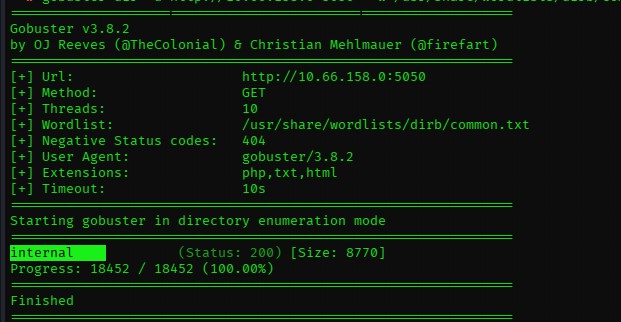
Visiting the endpoint revealed a login page.
http://$IP:5050/internal
Finding a hidden authentication portal significantly changed the direction of the assessment. Instead of continuing to enumerate random directories, the next step was examining how authentication was implemented.
Authentication Bypass
The login page appeared to accept user-supplied credentials and validate them against backend data.
This makes input-handling behavior important.
During testing, the authentication mechanism was found to be vulnerable to an authentication bypass condition. By manipulating the input used by the login request, it was possible to make the application’s authentication logic evaluate as true without possessing a legitimate password.
Security Concept: Authentication bypass vulnerabilities occur when an application incorrectly trusts user-controlled data while determining whether someone should be allowed access.
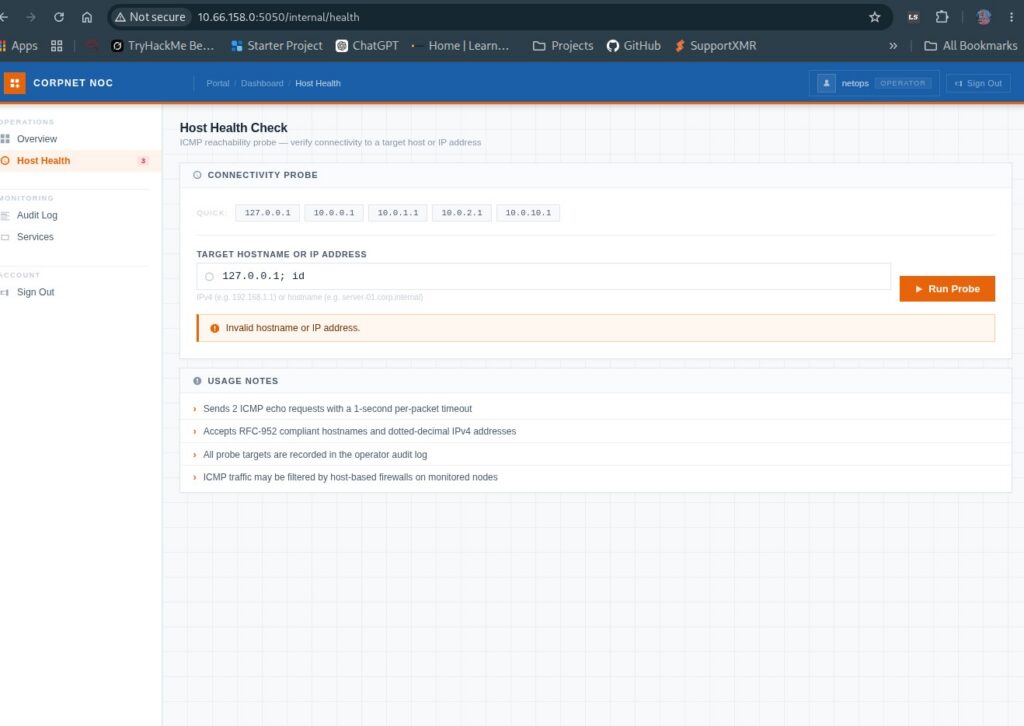
After bypassing authentication, the application redirected to:
/internal/dashboard
The resulting session provided access as an operator.
Why This Matters
Authentication systems should never construct backend queries directly from untrusted user input.
Applications should instead use:
- Parameterized queries
- Prepared statements
- Strong input validation
- Secure authentication frameworks
- Generic login failure responses
A hidden login page is not a security boundary. If an attacker can discover the endpoint, the authentication system itself must still withstand malicious input.
Discovering the Host Health Function
Once inside the internal dashboard, I enumerated the available functions rather than immediately attempting further exploitation.
One feature stood out:
Host Health
The feature appeared to test whether another host was reachable.
Functions like this frequently perform operating-system commands such as:
ping
That immediately makes input validation important.
If a web application takes a hostname or IP address supplied by the user and inserts it directly into an operating-system command, command injection may become possible.
Testing for Command Injection
I began by providing unexpected input and observing how the application responded.
The resulting errors suggested that the submitted value was being passed to a system command.
At this point, I intercepted the request using Burp Suite so I could modify the request directly.
Burp Suite is especially useful here because encoded characters may behave differently when entered into a browser form compared with modifying the raw HTTP request.
Testing eventually revealed that a URL-encoded newline was significant:
%0a
%0a represents a line feed character.
By inserting a newline into the value, it was possible to influence how the backend shell interpreted the request.

What Is Command Injection?
Command injection occurs when an application passes attacker-controlled input to the operating system without properly separating the data from the command being executed.
Conceptually, an application might attempt something similar to:
ping USER_INPUT
If USER_INPUT is not properly validated or safely handled, the operating system may interpret portions of that input as additional commands.
Defensive Measures
Developers should avoid invoking shell commands whenever a native programming-language API can perform the same function.
When external commands are unavoidable:
- Never concatenate raw user input into shell commands
- Use strict allowlists
- Validate expected IP address or hostname formats
- Avoid invoking commands through a shell
- Run the service using a minimally privileged account
- Log abnormal input and execution failures
Credential Discovery
Once command execution was available, I began enumerating the application environment and accessible files.
This led to the discovery of a configuration file named:
secret.config
The configuration contained credentials.
The credentials themselves are intentionally omitted from this walkthrough.
One important lesson here is that application configuration files frequently contain sensitive information such as:
- Database credentials
- Service accounts
- API tokens
- Backup accounts
- Internal usernames
- Encryption keys
Because SSH had already been identified during initial enumeration, the newly discovered credentials provided an obvious next avenue to investigate.
SSH Access
The credentials discovered through the web application were valid for SSH authentication.
The general connection format was:
ssh <username>@$IP
This provided an interactive Linux shell on the target.
At this point, the attack had transitioned from web exploitation to local Linux enumeration.
This is why thorough initial enumeration matters. Discovering SSH early meant that once credentials appeared later in the challenge, there was already a known service where they could be tested.
Linux Privilege Escalation Enumeration
After gaining a shell, I began looking for ways to escalate privileges.
Privilege escalation enumeration should normally include areas such as:
sudo -l
id
uname -a
find / -perm -4000 -type f 2>/dev/null
find / -type f -writable 2>/dev/null
Other useful areas to investigate include:
- SUID binaries
- Sudo permissions
- Cron jobs
- Writable scripts
- Running services
- Stored credentials
- Backup directories
- Application configuration
- Linux capabilities
- Kernel version
During enumeration of Silent Monitor, a backup directory contained a file using the .kdbx extension.
KeePass Database Discovery
Files ending in:
.kdbx
are commonly associated with KeePass password databases.
Finding one during privilege escalation enumeration is therefore worth investigating.
However, the path through this particular room did not ultimately require using the KeePass database.
Instead, examining the operating system and kernel provided another possible escalation path.
Kernel Enumeration
The kernel version can be checked with:
uname -a
or:
uname -r
Comparing the installed kernel against known vulnerabilities indicated that the system might be vulnerable to a recent local privilege escalation technique referred to in the room as Copy Fail.
Important: Kernel exploits should be treated carefully. Running exploit code against the wrong kernel or environment can crash the system. In a disposable TryHackMe lab this risk is manageable, but kernel exploit testing should never be performed against production systems without explicit authorization and a full understanding of the consequences.
After researching the vulnerability and reproducing the proof-of-concept code within the lab environment, the technique successfully resulted in elevated privileges.
At this stage, the machine was fully compromised.
No root flag or flag value is included here.
Attack Chain
The Silent Monitor room is a good example of why cybersecurity assessments require looking at the complete system rather than treating vulnerabilities individually.
The attack path was approximately:
Nmap Enumeration
        ↓
Python Web Application
        ↓
Directory Enumeration
        ↓
Hidden /internal Login
        ↓
Authentication Bypass
        ↓
Internal Dashboard
        ↓
Host Health Function
        ↓
Command Injection
        ↓
Configuration File Discovery
        ↓
Credential Discovery
        ↓
SSH Access
        ↓
Linux Enumeration
        ↓
Kernel Vulnerability
        ↓
Privilege Escalation
No single step was particularly complicated. The challenge came from recognizing how information discovered during one stage could be used during the next.
Tools Used
| Tool | Purpose |
|---|---|
| Nmap | Discover ports and running services |
| Dirb | Discover hidden web directories |
| Web browser | Interact with the application |
| Burp Suite | Intercept and modify HTTP requests |
| SSH | Obtain an interactive shell |
| Linux CLI tools | Perform local enumeration |
| Python | Reproduce the privilege escalation proof of concept inside the lab |
Defensive Lessons
Silent Monitor also demonstrates several defensive failures that organizations should avoid.
Protect Authentication Systems
Authentication code should use parameterized backend queries and should never construct database statements using raw user input.
Validate Network Diagnostic Inputs
Tools such as ping, traceroute, DNS lookup, and connectivity testers are frequent command-injection targets because they often call operating-system utilities.
User input should never be inserted directly into shell commands.
Protect Configuration Files
Sensitive configuration files should have restrictive permissions and should not contain reusable plaintext credentials whenever avoidable.
Secrets should instead be managed using dedicated secret-management mechanisms.
Avoid Credential Reuse
The discovered credentials became significantly more valuable because they were accepted by another network service.
Separate credentials should be used for different applications and administrative services.
Maintain Kernel Updates
Local privilege escalation vulnerabilities can turn a relatively limited application compromise into complete system control.
Operating systems should be patched regularly, particularly when publicly known local privilege escalation vulnerabilities affect the installed kernel.
Conclusion
TryHackMe Silent Monitor is an excellent room for practicing how multiple vulnerabilities can be chained together during a realistic penetration-testing workflow.
The challenge begins with basic network enumeration but gradually moves through web application testing, authentication bypass, command injection, credential discovery, SSH access, and finally Linux privilege escalation.
Although the room is rated around the medium difficulty level, the individual techniques are approachable enough that newer penetration testers can work through them with some research.
The biggest lesson from Silent Monitor is not any single exploit. It is the importance of remembering what you discovered earlier.
SSH initially appeared to be nothing more than another open port. Once credentials were recovered from the web application, however, that earlier discovery became the bridge into the operating system.
That is exactly how real penetration testing often works: enumerate thoroughly, document everything, and continually revisit earlier findings as new information becomes available.
Key Takeaways
- Begin every assessment with thorough service enumeration.
- Hidden directories can reveal functionality that the main website does not expose.
- Authentication mechanisms must treat all user input as untrusted.
- Network diagnostic functions are common command-injection targets.
- Configuration files frequently contain valuable secrets.
- Credentials discovered in one application may provide access to other services.
- Linux privilege escalation requires systematic local enumeration.
- Kernel vulnerabilities can turn limited access into complete system compromise.
- Individual weaknesses become much more dangerous when they can be chained together.
Important Commands
nmap -sT -sV -p- $IP
dirb http://$IP:5050
ssh <username>@$IP
id
sudo -l
uname -a
uname -r
Skills Practiced
- Network enumeration
- Web enumeration
- Authentication testing
- Burp Suite request manipulation
- Command injection testing
- Credential discovery
- SSH
- Linux enumeration
- Privilege escalation research
- Attack-path analysis
Defensive Considerations
The most important defensive lesson from Silent Monitor is defense in depth. Fixing only one vulnerability is not enough when several weaknesses exist across the same environment.
Secure authentication, command input validation, credential isolation, proper file permissions, least privilege, and consistent patch management all contribute to preventing the type of complete compromise demonstrated in this room.
SEO Settings
Focus Keyword: TryHackMe Silent Monitor Walkthrough
SEO Title:TryHackMe Silent Monitor Walkthrough: Auth Bypass & RCE
Meta Description:TryHackMe Silent Monitor walkthrough covering Nmap enumeration, authentication bypass, command injection, SSH access, and Linux privilege escalation.
Suggested URL Slug:tryhackme-silent-monitor-walkthrough
Excerpt:This TryHackMe Silent Monitor walkthrough covers the complete attack methodology from Nmap enumeration and hidden web discovery through authentication bypass, command injection, SSH access, and Linux privilege escalation without revealing flags or credentials.
Primary Keyword:TryHackMe Silent Monitor Walkthrough
Secondary Keywords:
- TryHackMe Silent Monitor
- Silent Monitor walkthrough
- Silent Monitor writeup
- TryHackMe authentication bypass
- TryHackMe command injection
- TryHackMe privilege escalation
- Burp Suite command injection
- Linux privilege escalation
- TryHackMe web exploitation
- Nmap enumeration
Suggested Tags:
TryHackMe, Silent Monitor, TryHackMe Walkthrough, Cybersecurity, Ethical Hacking, Penetration Testing, Nmap, Dirb, Burp Suite, Authentication Bypass, Command Injection, RCE, SSH, Linux, Privilege Escalation, Web Exploitation
Suggested Categories:
- TryHackMe
- Web Exploitation
- Linux
Suggested Featured Image Alt Text:TryHackMe Silent Monitor walkthrough authentication bypass command injection and privilege escalation
Suggested Screenshot Alt Text:
TryHackMe Silent Monitor Nmap enumerationTryHackMe Silent Monitor web applicationSilent Monitor Dirb directory enumerationTryHackMe Silent Monitor internal login pageSilent Monitor authentication bypassSilent Monitor internal dashboardSilent Monitor host health command injectionBurp Suite Silent Monitor command injectionSilent Monitor SSH accessTryHackMe Silent Monitor privilege escalation
Suggested Internal Links
Link Nmap enumeration to your Nmap or Linux enumeration content.
Link command injection to a future or existing Command Injection technique page.
Link Burp Suite to your Burp Suite tool page if available.
Link Linux privilege escalation to your privilege escalation techniques section.
Suggested External Link
For the external authoritative reference, link to the official OWASP Command Injection documentation from the command-injection section.
Rank Math Placement Check
To maximize the SEO score, make sure the exact phrase TryHackMe Silent Monitor Walkthrough remains:
- In the SEO title
- In the URL
- Near the beginning of the opening paragraph
- In at least one H2 heading if Rank Math requests it
- In the meta description
- In the body several times naturally
- In at least one image ALT attribute
- In the excerpt
If Rank Math specifically reports “Focus Keyword doesn’t appear in subheading(s)”, rename the first major section to: