
TryHackMe Support Walkthrough: From Web Enumeration to Remote Code Execution
Overview
The TryHackMe Support walkthrough is a web application penetration testing challenge that starts with basic enumeration and gradually develops into a much more interesting attack path.
The room begins with only SSH and HTTP exposed, but the web application contains several weaknesses that can be chained together. During the challenge, I worked through directory enumeration, credential discovery, browser storage manipulation, an IDOR vulnerability, path traversal/local file inclusion behavior, HTTP traffic analysis, and finally command execution through the application.
What I liked about this room was how several relatively small discoveries became important later. A file found during the first Gobuster scan, a value stored in the browser, and even a simple date/time feature all eventually became pieces of the attack path.
Note: This walkthrough documents the methodology I used to complete the room. TryHackMe flags are intentionally not included.
Initial Enumeration
As usual, I started by determining what services were exposed on the target.
nmap -sC -sV -p- -T4 $IP -oN nmap_scan.txt
The scan identified two open TCP ports:
| Port | Service | Version |
|---|---|---|
| 22 | SSH | OpenSSH 9.6p1 Ubuntu |
| 80 | HTTP | Apache httpd 2.4.58 |
With a web server running on port 80, the application immediately became the primary target for further enumeration.
The SSH service was worth keeping in mind, but at this stage I didn’t have credentials that could be used against it.
Directory Enumeration
The next step in the TryHackMe Support walkthrough was identifying files and directories that weren’t immediately visible through normal browsing.
I used Gobuster:
gobuster dir -u http://$IP \
-w /usr/share/wordlists/dirbuster/directory-list-2.3-medium.txt \
-x php,js,bak,zip,json
The enumeration returned several interesting resources:
/index.php
/info.php
/footer.php
/skins
/includes
/layout
/js
/api.php
/logout.php
/config.php
/dashboard.php
Three files immediately stood out:
dashboard.php
api.php
config.php
At this point I didn’t know exactly how each one would be useful, but config.php in particular was worth remembering.
That’s something I try to do during enumeration: don’t immediately dismiss discoveries just because their purpose isn’t obvious yet. A resource found early in a room often becomes important much later.
Password Discovery with Hydra
The homepage revealed an interesting message:
Contact IT Operations @ help@support.thmThis gave me what appeared to be a valid account:
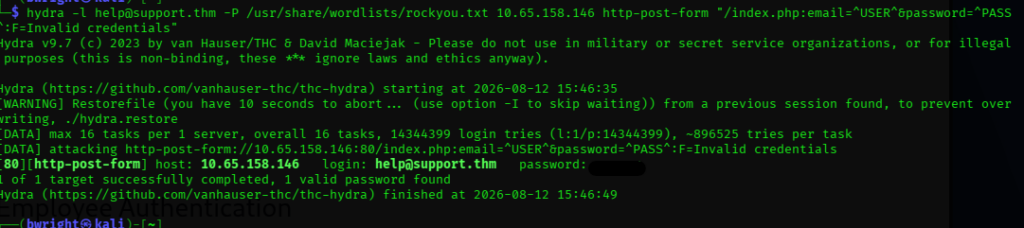
help@support.thmSince the email address was already known, the next step was testing the login form for a valid password. I used Hydra with the rockyou.txt wordlist.
hydra -l help@support.thm \
-P /usr/share/wordlists/rockyou.txt \
$IP http-post-form \
"/index.php:email=^USER^&password=^PASS^:Invalid credentials"
Breaking Down the Hydra Command
| Option | Purpose |
|---|---|
-l help@support.thm | Uses the discovered email as the fixed username |
-P rockyou.txt | Supplies the password wordlist |
$IP | Specifies the target system |
http-post-form | Tells Hydra to attack an HTTP POST login form |
^USER^ | Placeholder replaced with the supplied email |
^PASS^ | Placeholder replaced with each password candidate |
Invalid credentials | Identifies a failed login response |
Hydra cycles through passwords from rockyou.txt while keeping the discovered email address fixed.
The important part of the request is:
email=^USER^&password=^PASS^Hydra substitutes ^USER^ with:
help@support.thmand tests each password from the wordlist in place of ^PASS^.
The application responds with:
Invalid credentialswhen authentication fails, allowing Hydra to distinguish failed attempts from a successful login.
Eventually, Hydra identifies a valid password for the account.
I then authenticated using:
Email: help@support.thm
Password: [Discovered Password]
The actual password is intentionally omitted from this walkthrough.
Investigating Browser Storage
Once authenticated, I started looking at what the application stored client-side.
Investigating Browser Storage
Once authenticated, I started looking at what the application stored client-side.
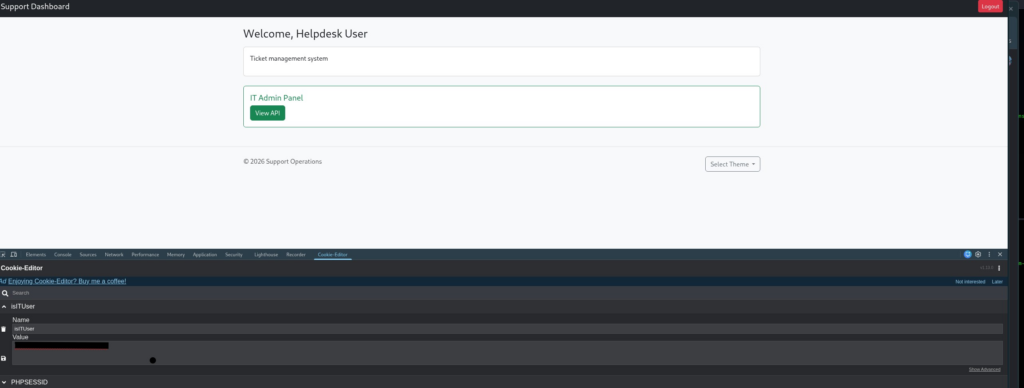
Firefox Developer Tools revealed an interesting value:
isITUser=68934a3e9455fa72420237eb05902327
The value looked like an MD5 hash.
Checking the hash showed that it represented:
false
That immediately raised an interesting question:
What happens if the application thinks isITUser is true?
I generated the MD5 hash for the string true:
echo -n "true" | md5sum
Result:
b326b5062b2f0e69046810717534cb09
I replaced the existing browser value with:
b326b5062b2f0e69046810717534cb09
After refreshing the application, an additional feature became available:
IT Admin Panel
View API
This was a good example of why client-side state should never be trusted for authorization decisions.
If a user can modify a value in browser storage and gain access to functionality simply by changing false to true, the application isn’t enforcing that authorization decision securely on the server.
Discovering an IDOR Vulnerability
The newly accessible API functionality provided another attack surface.
While testing the API, I discovered that user information could be retrieved by manipulating an identifier in the URL.
For example:
/user/1
returned information resembling:
{
    "email": "specialemail@support.thm",
    "2FA": false,
    "admin": true
}
This behavior indicated a possible Insecure Direct Object Reference, or IDOR.
An IDOR occurs when an application exposes internal object identifiers and fails to properly verify whether the requesting user should be allowed to access the requested object.
Instead of blindly enumerating large ranges, I experimented with the application’s existing URL structure and looked for useful information exposed through the API.
Revisiting config.php
This is where one of the discoveries from the original Gobuster scan became important.
Earlier I had found:
/config.php
While exploring the authenticated dashboard, I also noticed that the application supported different themes or skins.
Changing the theme modified the URL:
dashboard.php?skin=red
Any time I see a parameter being used to reference something that resembles a file, template, theme, language pack, or page, I start thinking about path traversal and local file inclusion.
I tested the parameter with:
dashboard.php?skin=../config
The application’s behavior changed.
Looking at the resulting page source exposed configuration information resembling:
<?php
$MASTER_PASSWORD = 'redacted';
$SITE_VER = '1.0';
$SITE_NAME = 'support_portal';
The actual password has been removed from this walkthrough.
This was a good reminder of why directory enumeration matters. config.php didn’t immediately provide anything useful when it was first discovered, but knowing that it existed gave me something specific to target once the vulnerable skin parameter was identified.
[Screenshot – Theme Parameter Testing]
Troubleshooting Authentication with Wireshark
Even after discovering the master password, authentication didn’t immediately work as expected.
Rather than continuing to guess, I decided to inspect what was actually happening on the network.
I opened Wireshark and filtered the traffic using:
ip.addr == TARGET_IP && http
I then attempted another failed login, stopped the capture, located the relevant HTTP conversation, and followed the HTTP stream.
This allowed me to see exactly what the application was sending.
The request wasn’t handling the credentials the way I expected. Characters within the submitted values were being transformed, which explained why credentials that appeared correct were still failing.
After adjusting the input based on what I observed in the HTTP request, authentication succeeded.
This was probably one of my favorite troubleshooting moments in the room because it reinforces an important habit:
When something doesn’t behave the way you expect, inspect the actual traffic.
The browser interface only shows you part of the story. Wireshark, Burp Suite, and browser developer tools can show you what is really being transmitted.
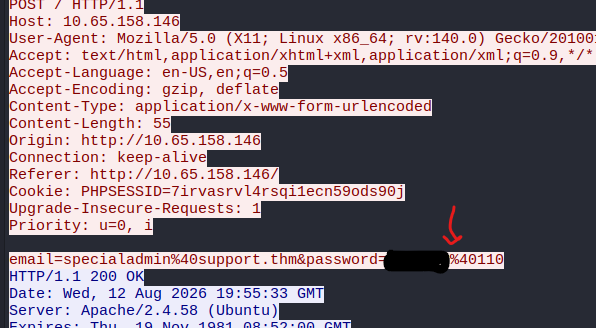
small hint -the @ is causing the %
Reaching the First Flag
With the authentication issue resolved, I was able to access the protected area containing the first room flag.
The flag itself is intentionally omitted.
More importantly, another feature on this page caught my attention: a Date/Time module.
Instead of moving on immediately, I started investigating how that feature worked.
Investigating the Date/Time Module
I executed the date functionality and then examined the page source.
The presence of a form using a POST request made me wonder whether the value being submitted could be manipulated.
That was enough reason to open Burp Suite.
I enabled interception, returned to the application, and switched between the Date and Time options. The specific choice didn’t really matter—the goal was to capture the request.
Once the request appeared in Burp, I sent it to Repeater and disabled interception.
Repeater made it possible to modify the request repeatedly without having to interact with the browser every time.
[Screenshot – Burp Suite Date/Time Request]
Testing for Command Execution
The request contained a parameter named:
sys
I started experimenting with its value.
Simply sending:
sys=ls
didn’t work as expected.
Instead of immediately abandoning the idea, I tried combining the application’s expected command with another command:
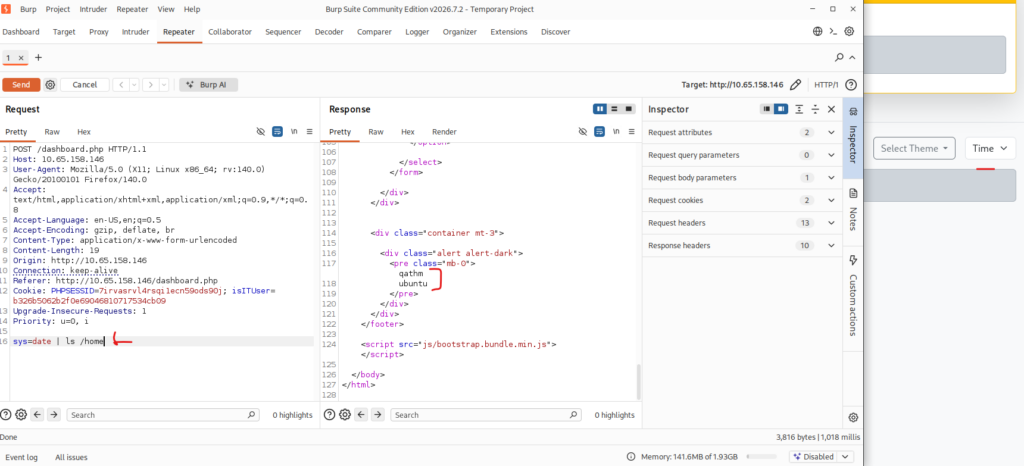
sys=date | ls
This time the response contained a directory listing.
That was the breakthrough.
The application appeared to be passing user-controlled input into a system command without properly sanitizing it.
In other words, the Date/Time feature could be abused for OS command injection.
Enumerating the System
Once command execution was confirmed, I started performing basic filesystem enumeration rather than immediately trying to launch a shell.
Looking under:
/home/
revealed multiple user directories.
I investigated the Ubuntu user’s home directory first and discovered:
user.txt
That provided the next flag for the room.
Again, the flag itself is intentionally omitted from this walkthrough.
]
Why the Vulnerability Chain Worked
The interesting part of the TryHackMe Support walkthrough wasn’t any single vulnerability. It was how the weaknesses could be chained together.
The overall attack path looked something like this:
Port Enumeration
        ↓
Web Enumeration
        ↓
Credential Discovery
        ↓
Authentication
        ↓
Client-Side Authorization Manipulation
        ↓
API Access
        ↓
IDOR Discovery
        ↓
Path Traversal / File Inclusion Behavior
        ↓
Configuration Disclosure
        ↓
HTTP Traffic Analysis
        ↓
Privileged Access
        ↓
POST Parameter Manipulation
        ↓
OS Command Injection
        ↓
Filesystem Enumeration
Each individual weakness increased access or revealed information that made the next stage possible.
Security Implications
Several defensive lessons stand out from this room.
Never Trust Client-Side Authorization
A browser value such as:
isITUser=false
should never determine whether someone receives administrative privileges.
Authorization must always be validated server-side.
Protect Object References
API endpoints should verify that the authenticated user is authorized to access the requested object.
Changing:
/user/1
to another identifier should not expose another user’s information unless the requester has permission to access it.
Validate File and Theme Parameters
Parameters such as:
?skin=red
should be restricted to a predefined allowlist.
For example, the application should accept only known themes rather than allowing arbitrary paths to reach the underlying filesystem.
Keep Configuration Files Outside the Web Root
Sensitive configuration information should not be accessible through the application.
Passwords, API keys, database credentials, and other secrets should be stored securely and never exposed through web-accessible files.
Never Pass Raw User Input to System Commands
The most serious vulnerability in the room was the ability to influence a system command through the sys parameter.
Applications should avoid invoking shell commands with user-controlled input whenever possible.
When external commands are unavoidable, strict validation and safe APIs should be used rather than passing raw input through a shell.
Tools Used
| Tool | Purpose |
|---|---|
| Nmap | Port and service enumeration |
| Gobuster | Web directory and file discovery |
| FFUF | Web request fuzzing and credential testing |
| Firefox Developer Tools | Browser storage and request inspection |
| CrackStation | MD5 hash identification |
| Wireshark | HTTP traffic analysis and authentication troubleshooting |
| Burp Suite | HTTP request interception and manipulation |
| Burp Repeater | Testing modified POST parameters |
Lessons Learned
The biggest lesson from this room was to keep track of discoveries even when they don’t seem useful immediately.
The config.php file discovered during the initial Gobuster scan didn’t provide the answer by itself. It became useful only after the theme parameter revealed a possible file inclusion weakness.
The same thing happened with the Date/Time feature. It looked like a minor application feature until examining the underlying POST request showed that user input might reach the operating system.
I also liked the Wireshark portion of this challenge. Instead of assuming the credentials were wrong when authentication failed, capturing the HTTP traffic showed what the application was actually doing with the submitted data.
That type of troubleshooting translates directly into real penetration testing and application debugging.
Key Takeaways
The TryHackMe Support walkthrough demonstrates how multiple web application weaknesses can be combined into a complete attack chain.
Main Lessons
- Enumerate thoroughly before attempting exploitation.
- Keep track of interesting files discovered during initial reconnaissance.
- Inspect browser storage for client-side application state.
- Never assume client-side authorization controls are trustworthy.
- Test API object identifiers for authorization weaknesses.
- Pay attention to parameters that reference files, themes, or templates.
- Use Wireshark or Burp Suite when HTTP behavior doesn’t match expectations.
- Examine POST parameters and application functionality for command injection.
- Confirm command execution with simple enumeration before attempting anything more complex.
Important Commands
nmap -sC -sV -p- -T4 $IP -oN nmap_scan.txt
gobuster dir -u http://$IP \
-w /usr/share/wordlists/dirbuster/directory-list-2.3-medium.txt \
-x php,js,bak,zip,json
echo -n "true" | md5sum
Skills Practiced
- Network enumeration
- Web content discovery
- HTTP fuzzing
- Browser storage analysis
- IDOR testing
- Path traversal testing
- Local file inclusion analysis
- HTTP packet analysis
- Burp Suite request manipulation
- OS command injection
- Linux filesystem enumeration
Defensive Considerations
The room demonstrates why applications need multiple layers of server-side validation. Authentication alone isn’t enough. Authorization, object access, filesystem interaction, configuration storage, and operating-system command execution all need independent security controls.
A single weak client-side value or poorly validated parameter can become the first step in a much larger compromise.