Building a Wazuh Domain Impersonation Monitor for Lookalike Websites
One of the more interesting security problems I ran into recently started with a warning about spoofed company websites.
The basic attack is simple. Someone registers a domain that looks close enough to a legitimate business domain, copies the branding from the real website, and uses that fake site to collect payments, credentials, or personal information.
That got me thinking about something I already had in place: Wazuh.
I already use Wazuh as a SIEM, so instead of adding another standalone security product, I wanted to see if I could build a lightweight external domain-monitoring process and feed the results directly into Wazuh.
The result became the Wazuh Domain Impersonation Monitor.
The original idea came from dealership website spoofing, but there is nothing dealership-specific about the project. The same approach can be used by virtually any organization that wants to watch for suspicious domains resembling its own.
What the Wazuh Domain Impersonation Monitor Does
Wazuh itself is very good at collecting, correlating, and alerting on security events, but it does not automatically search the Internet for domains that resemble your company domain.
That meant I needed a separate collection layer.
The monitor I built uses Python to:
- generate likely lookalike domains
- check whether those domains resolve in DNS
- check whether certificates have been issued for them
- compare them against the legitimate company domain
- ignore known-good alternate domains
- remember previous findings
- write suspicious results as JSON
- let Wazuh handle the alerting
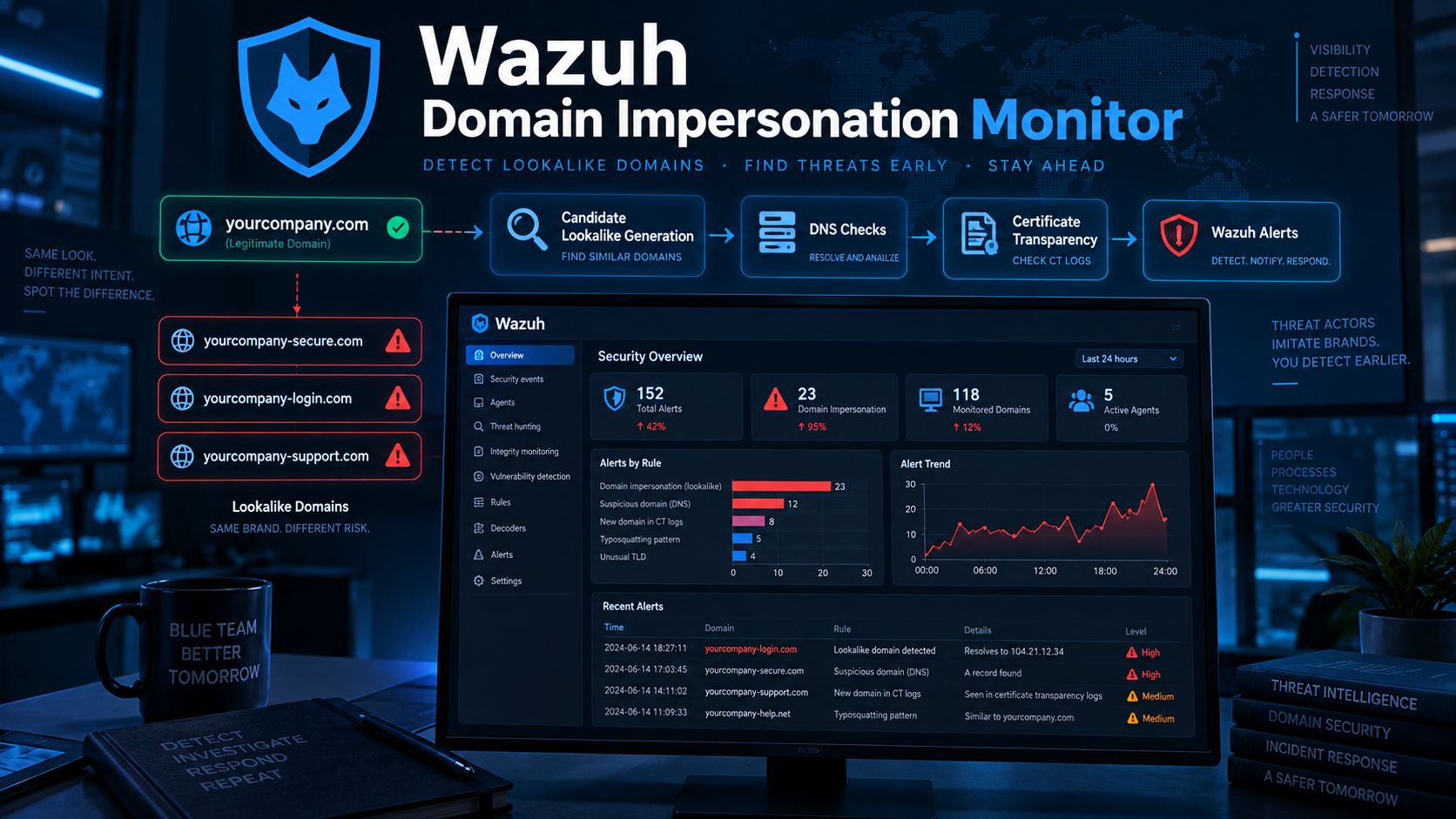
The overall workflow looks like this:
Protected Domain
      |
      v
Generate Lookalike Domains
      |
      v
DNS + Certificate Checks
      |
      v
Similarity Scoring
      |
      v
Allowlist + State Comparison
      |
      v
JSON Log
      |
      v
Wazuh
      |
      v
Alert / Email / Dashboard
The important part is that Wazuh remains the central security platform. The Python script simply gives it another source of telemetry.
Why DNS Alone Is Not Enough
My first thought was to generate suspicious domains and check whether they resolved.
That works, but it misses an important signal.
A domain can be registered and have a TLS certificate issued without currently having an active website. It can also temporarily lose its DNS record while still being relevant to an investigation.
That is where Certificate Transparency becomes useful.
Certificate Transparency logs provide public visibility into certificates issued by certificate authorities. If someone obtains a certificate for a domain that closely resembles your organization, that is something worth knowing about.
The monitor therefore checks both:
Does the domain resolve?and:
Has a certificate been issued for it?Neither condition proves that a domain is malicious, but together they provide useful indicators.
Generating Lookalike Domains
The Wazuh Domain Impersonation Monitor does not simply search for an exact domain name.
It generates common variations attackers might use.
For example, if the protected domain were:
yourcompany.com
possible candidates could include:
yourcompany.net
yourcompany-login.com
yourcompany-secure.com
yourcompany-support.com
yourcompany-portal.com
yourcompany-payments.com
yourcompany-official.com
secure-yourcompany.com
The script also generates simple typo variations, including:
Character deletion
Adjacent character swaps
Character substitutions
Alternate TLDs
Pluralization
Hyphen variations
Prefixes
Suffixes
The goal is not to generate every possible permutation on the Internet. That would quickly become noisy and inefficient.
The goal is to create a reasonable set of high-probability impersonation candidates.
Similarity Scoring
Each generated domain is compared against the legitimate domain using fuzzy matching.
For example:
yourcompany.com
yourcompany.net
would receive a relatively high similarity score.
Something unrelated would score much lower.
I currently use a configurable similarity threshold so organizations can decide how aggressive they want the detection to be.
A lower threshold increases coverage but can also create more false positives.
A higher threshold produces fewer results but may miss less obvious impersonation attempts.
Handling Legitimate Alternate Domains
One of the first things I ran into during testing was exactly what you would expect in a real environment: a suspicious-looking domain that was actually legitimate.
Organizations often own several variations of their primary domain.
For example:
yourcompany.com
yourcompany.net
yourcompanyinc.com
One may simply redirect visitors to the primary site.
Those domains should not repeatedly generate security alerts.
The configuration therefore includes an allowlist:
{
  "allowed_domains": [
    "your-known-redirect-domain.com"
  ]
}
The primary protected domain and the allowlisted domains serve different purposes.
The protected domain is what the script generates comparisons against.
The allowlist contains known-good domains that should be excluded from impersonation alerts.
Feeding the Results Into Wazuh
Once the script finds a suspicious domain, it writes a JSON event into a monitored log file.
An event looks roughly like this:
{
  "event_type": "domain_spoof",
  "legitimate_domain": "yourcompany.com",
  "suspicious_domain": "yourcompany-secure.com",
  "similarity": 95.5,
  "severity": "high",
  "dns_resolves": true,
  "certificate_found": true,
  "certificate_count": 1,
  "source": "domain-monitor"
}
Wazuh monitors the JSON file using a standard localfile configuration.
Custom Wazuh rules then determine how the finding is handled.
In my design:
Medium
Certificate or DNS evidence exists

High
DNS resolves AND certificate evidence exists
A high-severity event can then generate a normal Wazuh Level 10 alert and email notification.
That means the domain monitoring becomes part of the same workflow as other security events instead of living in a separate dashboard that someone has to remember to check.
Avoiding Duplicate Alerts
One problem became obvious almost immediately.
If the script runs every four hours and the suspicious domain still exists, Wazuh would receive the same alert every four hours.
That gets noisy very quickly.
To prevent that, the monitor maintains a local state file.
It remembers previously observed domains and only creates another event when something meaningful changes.
Examples include:
A newly discovered domain

DNS begins resolving

DNS stops resolving

A new IP address appears

MX records change

A certificate appears

Certificate count changes

Severity increases
If nothing changes, the script simply records:
[UNCHANGED]and Wazuh receives nothing new.
That makes the alerts much more useful.
Running It Automatically
The monitor runs as a systemd oneshot service.
A separate systemd timer executes it every four hours.
I also created a dedicated non-login service account instead of running the script under an administrator account.
The service uses additional hardening options such as:
NoNewPrivileges
PrivateTmp
ProtectSystem
ProtectHome
The process only receives write access to the directories it actually needs.
That is a small detail, but if this is going to run continuously on a security server, I would rather not give a simple Python monitoring script unnecessary privileges.
This Is Detection, Not Proof
One thing worth emphasizing is that the Wazuh Domain Impersonation Monitor does not declare that a domain is malicious.
A domain resembling your organization may belong to:
- your own marketing department
- a vendor
- another legitimate organization
- a previous domain owner
- a defensive registration
- a completely unrelated business
DNS resolution and certificate issuance are indicators.
They are not proof.
The alert should start an investigation, not automatically trigger a takedown request.
Where I Would Take This Next
The current version is intentionally lightweight.
There are several directions this could be expanded.
I would eventually like to add:
Homoglyph detection

Internationalized domain / punycode checking

Keyboard-adjacent typo generation

Domain registration feeds

HTML similarity checks

Page-title comparison

Favicon comparison

Screenshot comparison

Search engine discovery
At that point it starts becoming a small internal brand-protection platform rather than just a domain monitor.
For now, though, the current version solves the problem I originally set out to address: give Wazuh visibility into suspicious external domains that resemble a company’s legitimate domain.
GitHub Project
I published the code, example configuration, Wazuh rules, systemd service files, and installation instructions on GitHub.
Project files and installation instructions: Wazuh Domain Impersonation Monitor on GitHub
The repository is designed to remain generic so organizations can configure their own domains without exposing production information.
The project includes:
domain-monitor.py
config.example.json
requirements.txt
systemd service and timer
Wazuh rule examples
Wazuh logcollector configuration
README
If you already run Wazuh, this is a relatively simple way to add basic external domain impersonation monitoring without introducing another security platform.