How I Built My Own Spotify Playlist Using Python (And How You Can Too)
Ever wish Spotify had a playlist that existed only in your imagination? Turns out, you can build it yourself. And you don’t have to be a programmer to do it.
Build a Spotify Playlist with Python and discover how easy it is to create your own custom music collection using the Spotify API. Whether you want every live performance of your favorite song, concerts arranged chronologically, or a playlist that doesn’t already exist, this beginner-friendly project will show you how to make it happen. No previous programming experience required!
It Started With a Simple Question
Have you ever searched Spotify for something incredibly specific, only to discover that nobody has put together exactly what you’re looking for?
Sure, Spotify has millions of songs, thousands of playlists, and an algorithm that thinks it knows what you want to hear.
But what if you want something different?
What if you want every available live performance of a particular song? Or your favorite band’s concerts arranged in the order they happened, rather than the order the albums were released?
That’s the problem I ran into.
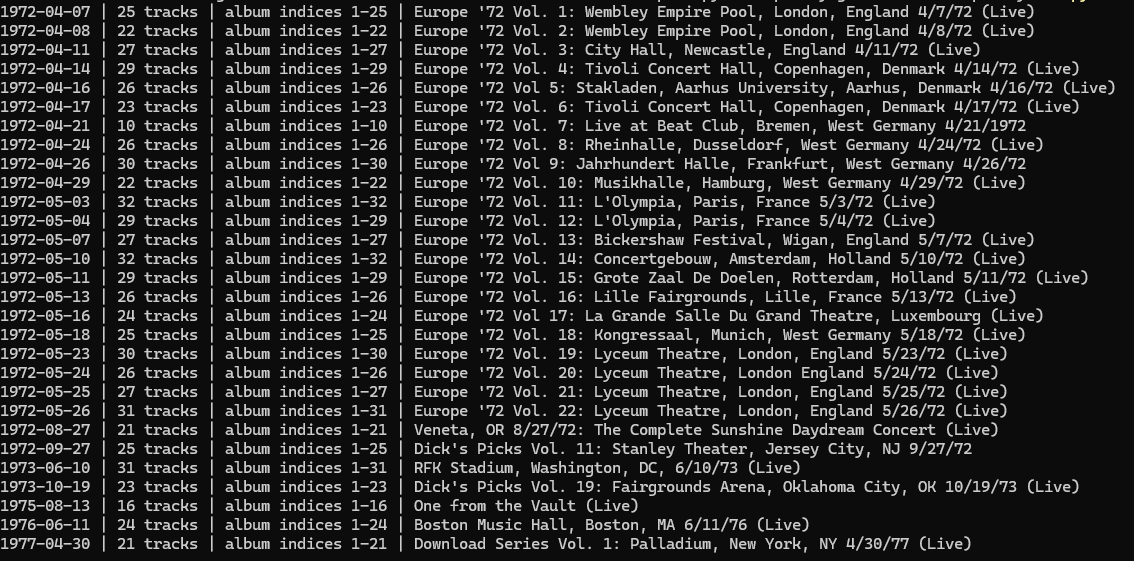
I’m a Grateful Dead fan, and I wanted to build something a little unusual: a playlist containing complete live concerts from 1972 through 1977, arranged chronologically.
Not a collection of greatest hits. Not somebody else’s favorite performances.
Actual concerts, in order.
I figured there had to be a better way than searching Spotify and dragging hundreds of songs around with my mouse.
There was.
And it involved something called an API.
What the Heck Is an API?
Don’t let those three letters scare you.
API stands for Application Programming Interface.
Imagine going to a restaurant.
You don’t walk into the kitchen, grab a frying pan, and start making dinner. You tell the waiter what you want, and the kitchen prepares it.
An API works a little like that waiter.
Your computer asks Spotify for information. Spotify looks through its catalog and sends back an answer.
For example, your computer might ask:
“Hey Spotify, show me songs by the Grateful Dead called Black-Throated Wind.”
Spotify responds with matching recordings.
Your program can then collect the songs you choose and ask Spotify to put them into a playlist.
That’s it. You’re giving Spotify instructions instead of clicking through everything manually.
And the best part? Spotify provides an API specifically for developers to work with its music catalog.
What We’re Going to Build
We’re going to create a little program called Spotify Playlist Maker.
It will let you:
- Search Spotify for songs and artists.
- See matching recordings.
- Choose which songs to include.
- Avoid adding the exact same Spotify track twice.
- Give your playlist a name.
- Create the playlist directly in your Spotify account.
No expensive programming software. No complicated database. No server sitting in your basement.
Just Python, Spotify, and a few minutes of setup.
You can even use the program I’ve already written, so you don’t have to write the code yourself.
Step 1: Install Python
Python is a programming language, but today you don’t have to learn how to program in it.
Think of Python as the engine that runs our little application.
Visit:
https://www.python.org/downloads
Download and install Python for Windows.
If the installer offers an option to add Python to your PATH, enable it.
Once Python is installed, open PowerShell.
That’s the command-line application built into Windows.
Type:
py --versionIf everything is working, you’ll see a Python version number.
Congratulations. You’ve already completed the first technical step.
Step 2: Get the Playlist Maker
Download the RootNotebook Spotify Playlist Maker ZIP file linked with this article.
Extract the files to a folder on your computer. For this example, we’ll use:
C:\SpotifyPlaylist
Inside the folder you’ll find three important files:
playlist_maker.py— The actual program.requirements.txt— A list of Python packages the program needs.README.txt— Setup instructions.
Open PowerShell inside that folder.
Run these commands, one at a time:
py -m venv .venv
.\.venv\Scripts\Activate.ps1
python -m pip install -r requirements.txt
The first command creates a separate Python environment for our project.
The second activates it.
The third installs the small pieces of software that let Python communicate with Spotify.
If PowerShell prevents activation, the README includes a temporary setting to fix that.
You only need to install the dependencies once.
Step 3: Ask Spotify for Permission
This is the part that sounds complicated but really isn’t.
Spotify needs to know that you’re allowing our program to create playlists in your account.
Go to:
https://developer.spotify.com/dashboard
Sign in to your Spotify account and create a new application.
Call it something like:
My Playlist Maker
In the application’s settings, enter this Redirect URI:
http://127.0.0.1:8888/callbackThat address points back to your own computer. It’s how Spotify sends you back to the program after you approve access.
Spotify will give your application a Client ID.
Think of it as your program’s identification card.
As of November 2026, Spotify requires an active Premium subscription for the owner of a new Development Mode application.
You do not need to share your Spotify password or Client Secret with the program.
Step 4: Introduce Python to Spotify
Now we tell our program which Spotify application belongs to us.
In PowerShell, enter:
$env:SPOTIPY_CLIENT_ID = "YOUR_CLIENT_ID"
$env:SPOTIPY_REDIRECT_URI = "http://127.0.0.1:8888/callback"
Replace YOUR_CLIENT_ID with the Client ID from your Spotify developer dashboard.
Keep the quotation marks.
These settings apply to your current PowerShell window, so you’ll need to enter them again if you open a new session.
Step 5: Run Your Very Own Playlist Maker
Here comes the fun part.
In PowerShell, type:
python .\playlist_maker.pyThe first time you run the program, Spotify may open your browser and ask you to authorize it.
Approve the request.
Now your program can search Spotify and create a private playlist on your behalf.
You’ll see a prompt asking you to search for an artist or song.
Let’s say you’re a Grateful Dead fan like me.
Enter:
Grateful Dead Black-Throated WindThe program will display up to ten matching results, numbered from 1 through 10.
Choose the numbers of the recordings you want.
For example:
1,2,3The program remembers those choices.
Want more music? Enter another search.
You can search for any artist or song you like. You aren’t limited to one band.
When you’re finished searching, just press Enter on an empty search prompt.
Step 6: Create Your Playlist
The program will show you the songs you’ve selected and ask for a playlist name.
Let’s call ours:
My Favorite Live Recordings
Next, the program asks you to confirm that you want to create the playlist.
Type:
CREATEAnd that’s it.
The program sends your selected songs to Spotify, creates a private playlist, and gives you a link.
Open Spotify, select the new playlist, and start listening.
You just created a playlist through an API!
Why Not Just Make a Playlist in Spotify?
That’s a perfectly reasonable question.
If you want ten songs by your favorite band, Spotify’s normal playlist feature is probably easier.
But what happens when you want hundreds of songs?
Or you’re searching for different recordings of the same song?
Or you want concerts organized by the dates they were performed?
That’s where a program becomes useful.
For my Grateful Dead project, we eventually organized 914 tracks from 37 concerts, covering 1972 through 1977, into chronological order.
We also found that some concert albums included bonus tracks from other performances. We had to identify those songs and leave them out to keep the playlist accurate.
The computer handled the repetitive work. We handled the decisions.
That’s an important difference.
Automation doesn’t mean you stop paying attention. It means you spend less time doing the boring parts.
A Few Things I Learned Along the Way
Not everything worked perfectly the first time.
We ran into a few problems worth mentioning.
Spotify sometimes limits how many requests your program can make.
If your program asks for too much information too quickly, Spotify may temporarily stop answering. This is called rate limiting.
If that happens, don’t keep restarting the program over and over. Give Spotify time, and try smaller searches.
Spotify doesn’t always know when a concert actually happened.
An album released in 2020 might contain a concert recorded in 1973.
If you’re building a chronological playlist, you may need to research those dates yourself.
Spotify search doesn’t guarantee that you’ve found every recording.
Our beginner program displays ten matches per search. Try different search terms if you’re looking for alternate recordings.
And finally, a Spotify API playlist doesn’t download music.
Our program organizes music that Spotify already provides. You still listen to everything through Spotify.
What Else Could You Build?
Once you understand the basic idea, the possibilities become interesting.
Imagine creating a playlist containing nothing but live versions of one particular song.
Or every recording you can find from a favorite concert venue.
Maybe you want music from the year you graduated high school.
Or songs released during the decade you grew up.
You could even expand the program to read a spreadsheet containing hundreds of songs and build playlists automatically.
The point isn’t that everybody needs to become a programmer.
It’s that you can take an idea, find a tool that makes it possible, and build something useful.
Even if you’ve never written a line of code.
Final Thoughts
When I started this project, I just wanted to listen to the Grateful Dead between specific years. No Concert is the same, and so many changes took place within those 30 years.
I ended up learning a little more about Python, APIs, Spotify, and automation.
And I got the playlist I wanted.
That’s one of the things I enjoy about technology. Sometimes the best projects start with a question as simple as:
“I wonder if there’s a way to do that?”
Turns out, there usually is.
And occasionally, it’s easier than you think.
Want to try it yourself?
Download the free RootNotebook Spotify Playlist Maker, follow the instructions above, and create something that’s entirely your own.
Project tested on Windows using Python and Spotify’s Web API. Spotify API requirements and available recordings may change over time.
More about Python Virtual Enviroment. Link Here –>